

Sales reps - Turn 1 screen recording into 20+ short clips that close deals
Turn screen recordings into short clips that close more deals. Turn screen recordings and demos into short, captioned clips with automatic zooms. Help sales reps explain faster and close more deals.
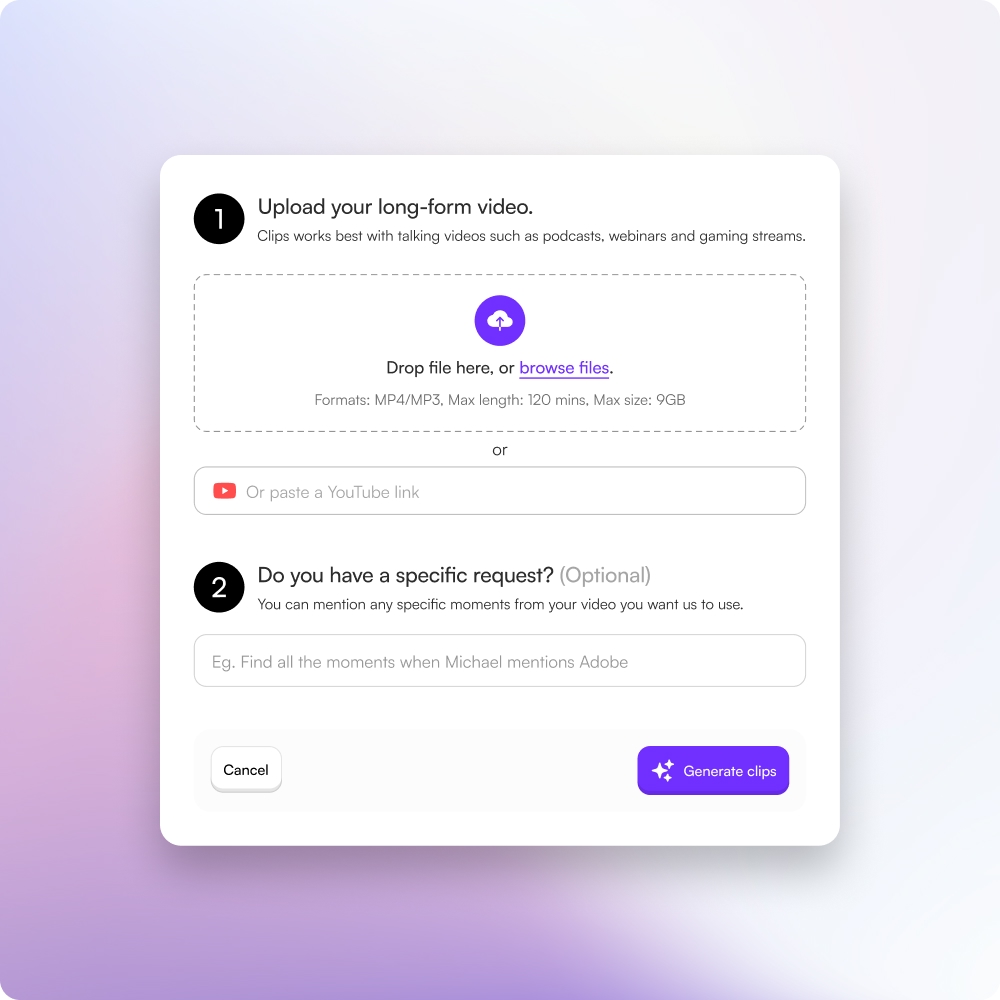
Turn screen recordings into short clips that close more deals
1
Record your screen
Record product demos, walkthroughs, or sales explanations.
2
Auto-zoom and caption
Choppity automatically zooms into key areas and adds captions.
3
Trim into short clips
Create multiple short clips from one recording.
4
Share and close deals
Share clips anywhere prospects engage.
01 — The problem
Sales demos don’t scale
Live demos and long recordings are hard to reuse and even harder to follow up with.
- One-to-one demos don’t scale across prospects
- Recording, editing, and trimming demos takes hours
- Prospects forget details after calls

02 — The solution
Create reusable sales clips automatically
Choppity turns screen recordings into clear, focused sales clips.
- Automatic zooms highlight exactly what matters on screen
- Captions make demos easy to watch with sound off
- Create multiple clips from a single recording in minutes

03 — The outcome
Shorten sales cycles and improve conversions
Short, focused clips help prospects understand value faster.
- Improve clarity and product understanding
- Increase engagement in follow-ups
- Move deals forward without repeating demos

04 — Built for selling
Explain once, reuse everywhere
Use the same demo clips across emails, CRM follow-ups, landing pages, and onboarding. Choppity helps sales reps sell smarter, not harder.
Try it for free
These podcasters, creators, content teams and founders said yes, look what happened
Here's what happened when you stop trying tools or dabble with video editors and start using Choppity.
"All these random startups and VC-backed companies going after the "creator economy". Now this is how you do it. For creators, built by creators. Super bullish on products being built for the pain points already felt deeply by the founder. Let's goooooo!"

Alex B.
YouTuber & Founder, EfficientApp
"Exactly the solution I was looking for. Just generated all these clips whilst in bed! Awesome work and congrats on the launch"

Ramish
YouTuber & Designer
"After a few small technical issues the team really went above and beyond to help. They were fast and efficient and really made all the difference. I don’t think I have had this type of customer service … maybe ever lol - Thank you and recommend"

Nicole B.
Content creator
"We've been using Choppity for the last 6 months or so for the AutoTrader tech podcast. We've seen a massive increase in our views and subscribers! Couldn't have done it without Choppity."
Callum B.
Product Lead, AutoTrader
"Since we've started using Choppity, our socials have seen a 4x increase in overall views across our channels. Love the non-stop product updates as well."

Vaibhav
Founder, SmartLead.ai
"Want cleaner podcasts without spending hours editing? We found an AI tool that automatically censor swear words audio bleeps AND caption cleanup! Choppity. Game changer"
AwesomeCast
Tech Podcast
"The Choppity team have been shipping new updates to the product which I am quite happy about. It's getting faster and they are also giving us the features we've been asking for!"

Amy L.
Finance creator
"In the past I've tried to get my YouTube video editor to create mass amount of short form content, but they struggled. Economically it didn't make sense and the quality wasn't great. Choppity has been an INCREDIBLE asset in scaling up my short-form video reach. Having ALL the clips automatically clipped, styled and ready to publish has been the biggest lever to growing my businesses."
Michael W.
YouTuber & Designer
More use cases
content creators
Turn long videos into short-form clips automatically. Save editing costs, publish more content, and avoid creator burnout.
Learn morepodcasters
AI podcast clip generator built for podcasters. Upload any episode and get 30+ captioned vertical clips with direct scheduling — no editor required.
Learn moremarketing agencies
Help clients grow audiences and generate leads using short-form video. Turn long videos into 20–50+ clips, reduce editing time by 80%+, and improve ROI.
Learn morechurches
Transform sermons into short-form video clips. Reach more people globally, build local and global presence, and tap into the short-form content economy with 90% of internet traffic.
Learn moreFAQ
Common questions about Choppity and how it works
Can I share sales clips on landing pages and in email campaigns?
Absolutely! Choppity exports clips that work perfectly in landing pages, email campaigns, CRM systems, and anywhere prospects engage. Use the same clips across all touchpoints to create consistent, clear messaging that converts.
How much time does Choppity save compared to manually editing sales demos?
Choppity saves hours of manual editing work. Instead of spending hours recording, editing, and trimming demos, you can create multiple reusable clips in minutes, allowing you to focus on selling instead of video production.
Can I use Choppity to create onboarding videos for new customers?
Yes! Choppity is perfect for creating onboarding clips from your existing demos and walkthroughs. Turn one comprehensive demo into multiple focused clips that guide new customers through specific features and workflows.
How can clips help me follow up with prospects after calls?
Short clips are perfect for follow-up messages that reinforce key points from your calls. Send clips via email or CRM to help prospects remember important details, answer questions, and move deals forward without scheduling additional demos.
Can I add captions to sales clips for silent viewing?
Yes! Choppity automatically adds captions to all clips, making demos easy to watch with sound off. This is essential for prospects who watch content on mobile devices or in quiet environments, improving engagement and understanding.
How long does it take to turn a screen recording into sales-ready clips?
Choppity can process screen recordings and generate clips in minutes rather than hours. This eliminates the time-consuming process of manually recording, editing, and trimming demos, allowing you to create reusable clips quickly.
Can I reuse the same demo clips across different prospects?
Absolutely! Choppity lets you explain once and reuse everywhere. Use the same demo clips across emails, CRM follow-ups, landing pages, and onboarding—helping you sell smarter, not harder, without repeating demos for every prospect.
How can short clips help me close more deals?
Short, focused clips help prospects understand value faster and move deals forward without repeating demos. By sharing clips in follow-ups, emails, and CRM messages, you can improve clarity, increase engagement, and shorten sales cycles.
Can Choppity automatically zoom into important areas on my screen?
Yes! Choppity automatically zooms into key areas on screen to highlight exactly what matters during your demo. This makes your sales clips clearer and helps prospects understand your product faster without manual editing.
How many clips can I generate from one screen recording?
Choppity can generate 20+ short clips from a single screen recording or sales demo. The AI automatically identifies key moments, product highlights, and important explanations that you can reuse across emails, CRM follow-ups, and landing pages.