

YouTube Clipper — Trim YouTube Videos to MP4 Online
Free YouTube clipper online. Paste a YouTube video link, drag start and end timestamps, and export an MP4 in 360p or 1080p.
Processing…
This will only take a moment…
Loved and used by real creators, podcasters, brands and more
 LockedOn Lakers
 Jeremy Vine & Daytime on 5
 Lighten Up Podcast
  Unscripted by Raygan
 Made by Mizko
 Design Champs
  MotDollarMiljonen
 Southside Presbyterian Church
 Hope Rising Church Southside Presbyterian Church
 Let The Streets Rejoice
  LockedOn Lakers Jeremy Vine & Daytime on 5 Lighten Up Podcast
  Unscripted by Raygan Made by Mizko Design Champs
  MotDollarMiljonen Southside Presbyterian Church Hope Rising Church
  Southside Presbyterian Church Let The Streets Rejoice LockedOn Lakers Jeremy Vine & Daytime on 5 Lighten Up Podcast Unscripted by Raygan Made by Mizko Design Champs MotDollarMiljonen Southside Presbyterian Church Hope Rising Church Southside Presbyterian Church Let The Streets Rejoice LockedOn Lakers Jeremy Vine & Daytime on 5 Lighten Up Podcast Unscripted by Raygan Made by Mizko Design Champs MotDollarMiljonen Southside Presbyterian Church Hope Rising Church Southside Presbyterian Church Let The Streets Rejoice
 Trusted by teams at



 MPS Society
 SonatypeMPS SocietySonatypeMPS SocietySonatypeMPS SocietySonatype
 How to use this tool
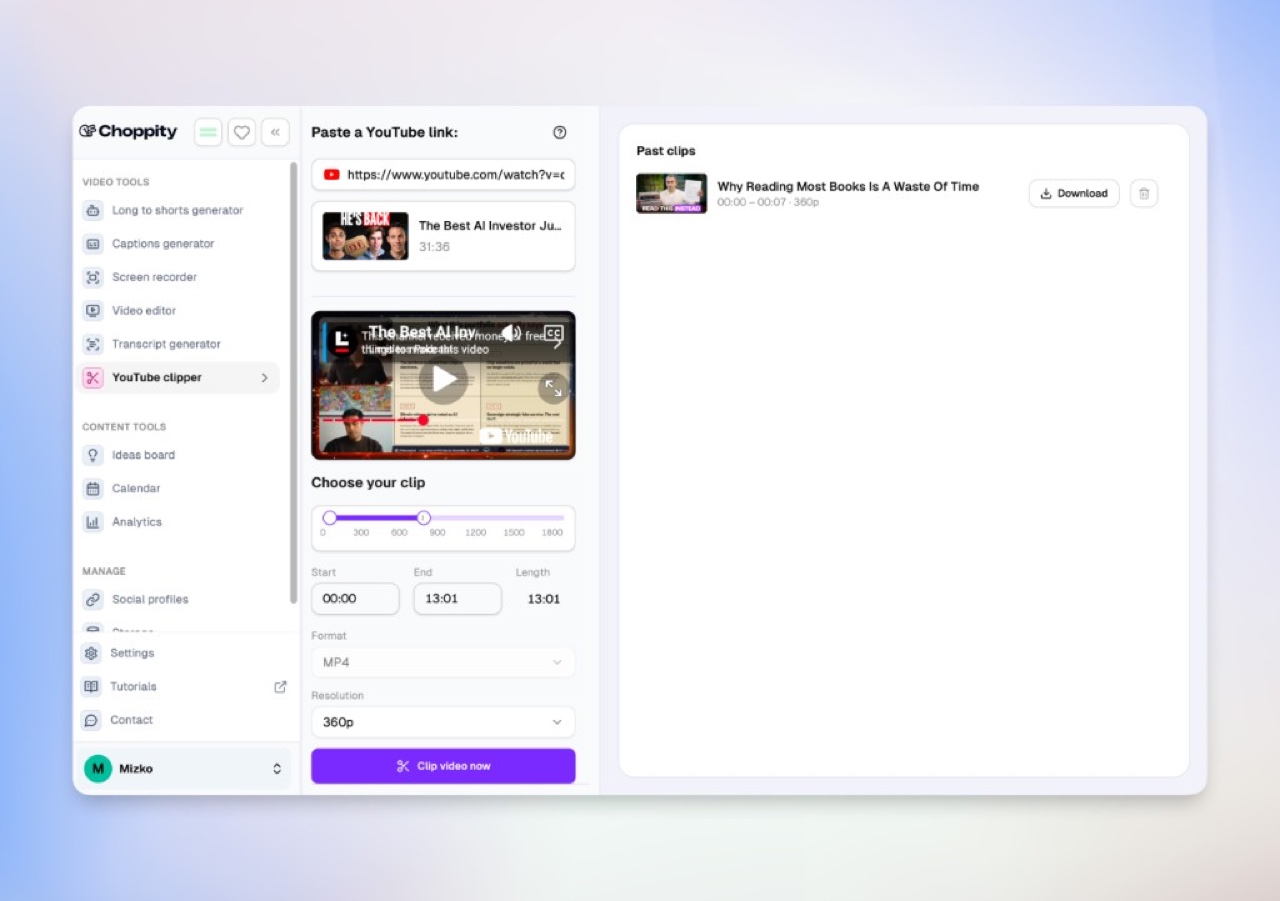
Paste a YouTube link
Paste the video link — a normal watch, Shorts, or youtu.be URL is all you need. No ?start= parameters or embed codes. We load the title, thumbnail, and preview automatically.
Pick your start and end timestamps
Drag the range handles or type MM:SS for precise in and out points—the same trim workflow people expect from a YouTube clipper online.
Export in 360/1080p and MP4
Choose MP4 and your resolution (360p up to 1080p), then click Clip video now to finish the export in Choppity.
Clip any moment
Keep the good 10 seconds. Skip the rest.
Paste a plain YouTube video link. Drag the start and end handles to the exact moment you want, and export a clean MP4 in under a minute. We handle the trim, preview, and export from that single link.
Part of Choppity’s Short Clips Generator. Already know your timestamps? You’re in the right place. Want AI to find the moment instead? Try the YouTube to Shorts converter or Podcast Clip Generator.
Whether it’s a funny moment, an insightful quote, a key scene from a lecture, a product demo, or a 30-second hook from a podcast episode — get in, clip what you need, and move on.
Who it’s for
Built for creators, teachers, marketers, and teams
Anyone who needs a quick, shareable clip from a YouTube video.
Creators and podcasters lift the best 30–60 seconds out of long-form uploads and turn them into Shorts, Reels, and TikToks with the YouTube to Shorts converter and caption generator.
Teachers and educators trim a 2-minute clip from a 1-hour lecture and drop the MP4 straight into Google Classroom, Canvas, or Moodle — no ads, no recommended videos pulling students off-task.
Marketers and brand teams save founder interviews, competitor ads, and product demos as MP4 files for decks, ad inspiration boards, and Slack — then schedule them with the social media video scheduler.
Researchers and analysts archive specific moments from earnings calls, conference talks, and policy hearings as durable files for citation and review.

How we compare
Choppity vs other YouTube clippers
Other YouTube clippers ask you to hand-craft a ?start= URL, build an embed code with start/end in seconds, or install a Chrome extension. Choppity only needs the video link — paste it, pick your timestamps in the UI, and we handle the rest. Here’s how that compares to the most-clicked alternatives.
| Tool | What you paste | What you get | Resolution | Best for |
|---|---|---|---|---|
|
Recommended
Choppity (this page) | Plain YouTube video link | A real MP4 file you own, inside a workspace with captions, transcripts, and Shorts conversion | 360p or 1080p MP4 | Creators, teachers, marketers, and teams who need a downloadable clip plus an editing workflow |
| YouTube Clipper (Chrome extension) | Nothing — works on the page you’re watching | A shareable link to the last 30 seconds of the video | YouTube playback quality | Quickly sharing a moment with someone who will watch on YouTube |
| TubeChop | Plain YouTube video link | A time-coded YouTube share link (free links expire after 7 days) | YouTube playback only — no file | Teachers sharing a moment that plays inside YouTube |
| youtube2clip | Plain YouTube video link | A one-off MP4 or MP3 download | Varies by source | Quick downloads with no editing or storage needed |
| Embed code generators | Video link plus start/end times you convert to seconds | A YouTube <iframe> with start and end parameters | YouTube playback only — no file | Embedding a precise YouTube moment on a blog or course page |
With Choppity you never touch ?start= parameters or embed code — just the video link and the trim handles.
More clipping tools
Manual trims, AI clip finders, captions, and scheduling — pick the right tool for your workflow.
Short Clips Generator feature →
The full AI clipping workflow this tool belongs to.
Podcast Clip Generator
AI episode → dozens of viral shorts.
YouTube to Shorts Converter
AI finds hooks for Shorts automatically.
Free Video Caption Generator
Add animated burned-in captions to any clip.
Clip Anything
Search transcripts before cutting.
Social Media Video Scheduler
Schedule clips to TikTok, Reels, Shorts, and more.
Try our AI video editing platform
At Choppity we help content creators turn long videos into viral short clips. We use AI to automatically identify highlights, add animated captions, and optimize content for each social platform.
Try it for freeThese podcasters, creators, content teams and founders said yes, look what happened
Here's what happened when you stop trying tools or dabble with video editors and start using Choppity.
"Since we've started using Choppity, our socials have seen a 4x increase in overall views across our channels. Love the non-stop product updates as well."

Vaibhav
Founder, SmartLead.ai
"In the past I've tried to get my YouTube video editor to create mass amounts of short-form content, but they struggled. Choppity has been an INCREDIBLE asset."
Michael W.
YouTuber & Designer
YouTube Clipper — Trim YouTube Videos to MP4 Online FAQs
Common questions about this tool and how it works
What is a YouTube clipper?
A YouTube clipper lets you take a specific start and end moment inside a video and save just that window. With Choppity, paste a plain YouTube video link, pick your timestamps in the UI, and we export a real MP4 you can download, edit, and repost — no ?start= URL tricks or embed codes.
Is this YouTube clipper free? Do I need to sign up?
Pasting a link, previewing the video, and choosing your start/end timestamps is completely free with no signup. You only sign up at app.choppity.com when you want to render and download the MP4 — the free plan covers your first clips so you can try the full export before paying.
Do I need to add ?start= or embed parameters to my link?
No. Paste the normal YouTube video link — watch, Shorts, or youtu.be. You do not need to append ?start=, ?t=, or end= to the URL, and you do not need an embed link. We load the full video from that link and you set the trim points with the slider or timestamp fields.
Does it work for Google Classroom, Canvas, or other LMS lessons?
Yes. Teachers use the clipper to trim a 2-minute moment out of a 1-hour lecture, then upload the MP4 directly into Google Classroom, Canvas, Moodle, Schoology, or a Notion lesson plan. Because it’s a real file instead of a YouTube link, students see no ads, no recommended videos, and no risk of the source video being taken down mid-semester.
How is this different from the YouTube Clipper Chrome extension?
The "YouTube Clipper" Chrome extension clips and shares the last 30 seconds of a YouTube video as an embed link — it never produces a file and only works inside Chrome. Choppity is a hosted web app that works in any browser with no extension install, lets you pick any start/end window (not just the last 30 seconds), and exports a real MP4.
Can I extract just the audio as MP3?
This page focuses on video MP4 clips at 360p and 1080p, which covers the dominant YouTube clipper search intent. If you need audio-only, the cleanest path is to export an MP4 here and convert it, or use our <a href="/tools/free-youtube-script-extractor/">YouTube script extractor</a> when what you really want is the text of the spoken content.
Which URLs does the YouTube clipper accept?
Any standard public YouTube video link: youtube.com/watch?v=…, youtube.com/shorts/…, or youtu.be/…. Paste the link as you would copy it from the address bar — no embed URLs, no ?start= parameters. Live streams and private or members-only videos will not load.
What resolution and format does the exported clip use?
Clips export as MP4 (H.264/AAC) at either 360p for small file sizes or 1080p full HD. MP4 is the safest format for editing software, social platforms, LMS uploads, and presentation tools, which is why we standardized on it instead of also offering WebM.
What happens after I click "Clip video now"?
You’re taken to app.choppity.com/youtube-clipper to sign in (or create a free account) and the trim window you set up here is carried across. We render the MP4 in the cloud and drop it into your workspace alongside <a href="/tools/free-video-caption-generator/">captions</a>, <a href="/tools/free-youtube-script-extractor/">transcripts</a>, the <a href="/tools/youtube-to-shorts-converter/">Shorts converter</a>, and <a href="/tools/social-media-video-scheduler/">scheduling</a> so you can finish the job in one place.
Should I use this, Podcast Clip Generator, or YouTube to Shorts Converter?
Use this YouTube clipper when you already know the exact start and end timestamps you want. Use the <a href="/tools/podcast-clip-generator/">Podcast Clip Generator</a> when you have an hour-long episode and want AI to surface dozens of clip-worthy moments. Use the <a href="/tools/youtube-to-shorts-converter/">YouTube to Shorts Converter</a> when you want AI to find viral hooks and reformat them to 9:16 automatically.
Learn more about captions & subtitles
Guides, tutorials, and platform deep-dives from the Choppity blog.
More free tools
Animated Subtitles Generator (Free Animated Captions Tool)
Create stunning animated subtitles for your videos instantly. Our free animated subtitles generator adds eye-catching motion effects.
Try freeAdd Subtitles to Video Online Free - AI Subtitle Generator
Add subtitles to video online free with our AI subtitle generator. Upload any video and get accurate subtitles in seconds.
Try freeFacebook Reel Caption Generator (Add Captions Facebook Reel - Free Tool)
Add captions to your Facebook Reels instantly with our free AI tool. Upload any video and get perfectly formatted captions in minutes.
Try freeFree Facebook Video to Transcript Generator
Convert any Facebook video to text instantly. Upload your video or paste a link to get an accurate transcript. Free.
Try freeFree Video Caption Generator - Add Animated Subtitles & Captions to Videos with AI
Upload your MP4 or MOV, pick a caption style and transitions, and our AI automatically adds animated subtitles to your video. Download the finished MP4 or post straight to socials. 100% free.
Try freeHormozi Caption Style Generator - Free Alex Hormozi Subtitles
Generate Alex Hormozi-style animated captions for your videos instantly. Free tool. Get viral Hormozi caption style now!
Try free