01
Automated clip generation
Turn podcast episodes, webinars, interviews, and long videos into short social-ready clips from your own backend.
From video to clipsBUILD WITH CHOPPITY API
Turn long videos into clips, render the finished MP4s and build your publishing workflow. All from your own code.
For content pipelines, internal tools and your next product.
FROM YOUR APP TO YOUR NEXT CLIPS
Send a video URL or upload a file. Let Choppity find the moments, then render the clips you choose.
WHAT WILL YOU BUILD?
Bring Choppity’s video tools into the products and automations your team already uses.
Turn podcast episodes, webinars, interviews, and long videos into short social-ready clips from your own backend.
From video to clipsConnect Choppity to automations, n8n flows, content ops dashboards, or internal admin systems with API keys.
Built around your toolsTrack publishing events for scheduled, published, failed, and drafted posts so downstream systems stay in sync.
Keep your systems in syncBUILD YOUR SOCIAL PUBLISHING WORKFLOW
THE CLIP GENERATION PIPELINE
Start with a source file. Choose your clips. Get the finished outputs and let your app know when they’re ready.
POST a public video URL, or mint a presigned upload URL for local files up to 5 GB, then pass the upload ID into the clipping pipeline.
Choppity analyzes the source video, finds strong moments, and returns a project with short-form clip previews ready for review.
Trigger renders for approved clips and receive signed MP4 URLs when the final outputs are ready to use in your product or workflow.
Stop polling for status changes. Register an HTTPS endpoint and get notified when clips, renders, uploads, or social posts change state.
LET YOUR APP KNOW WHAT’S NEXT
Register an HTTPS endpoint and subscribe to the events your workflow cares about. React when clips are ready, renders complete, uploads fail or social posts publish.
asset.creation.succeededasset.analysis.succeededasset.analysis.failedproject.render.succeededproject.render.failedpost.publishedpost.scheduledpost.failed/v1/webhooksSubscribe to clip analysis events
curl https://api2.choppity.com/v1/webhooks \
  -H "Authorization: Bearer YOUR_TOKEN" \
  -H "Content-Type: application/json" \
  -d '{
    "endpoint_url": "https://your-app.com/hooks/choppity",
    "events": ["asset.analysis.succeeded"]
  }'
Replace the token and endpoint URL with your own values.
CONNECTED TO YOUR WORKSPACE
Manage webhook subscriptions in Choppity. Choose the events your workflow needs across uploads, clip analysis, renders and social posts.
Start with the documentation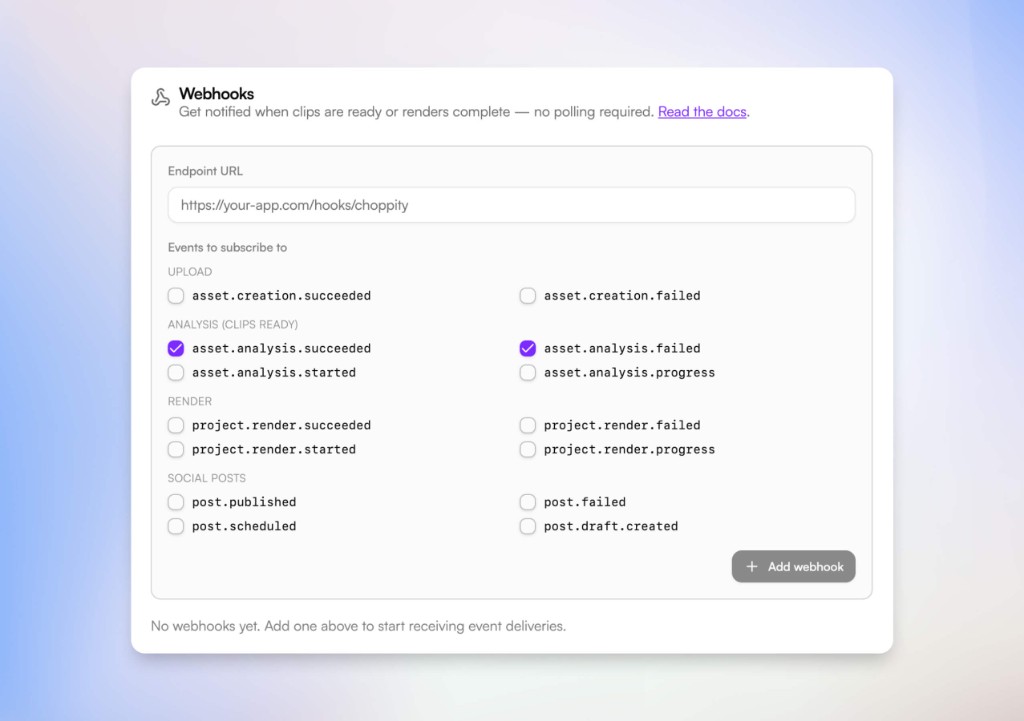
START BUILDING WITH CHOPPITY
Generate clips, render finished outputs and keep your app up to date with webhooks.
Prefer to work through your AI assistant? Explore MCP