

The Opus Clip Alternative: Faster, Clearer, and Actually All-in-One
Hour-based pricing with no credit traps. Faster end-to-end processing on the same upload. Clip, edit, and schedule to TikTok, Reels, Shorts, and LinkedIn without exporting out.
- Hour-based plans with no credit traps
- Faster end-to-end processing on the same upload
- Clip, edit, and schedule without leaving the app
Loved and used by real creators, podcasters, brands and more
 LockedOn Lakers
 Jeremy Vine & Daytime on 5
 Lighten Up Podcast
  Unscripted by Raygan
 Made by Mizko
 Design Champs
  MotDollarMiljonen
 Southside Presbyterian Church
 Hope Rising Church Southside Presbyterian Church
 Let The Streets Rejoice
  LockedOn Lakers Jeremy Vine & Daytime on 5 Lighten Up Podcast
  Unscripted by Raygan Made by Mizko Design Champs
  MotDollarMiljonen Southside Presbyterian Church Hope Rising Church
  Southside Presbyterian Church Let The Streets Rejoice LockedOn Lakers Jeremy Vine & Daytime on 5 Lighten Up Podcast Unscripted by Raygan Made by Mizko Design Champs MotDollarMiljonen Southside Presbyterian Church Hope Rising Church Southside Presbyterian Church Let The Streets Rejoice LockedOn Lakers Jeremy Vine & Daytime on 5 Lighten Up Podcast Unscripted by Raygan Made by Mizko Design Champs MotDollarMiljonen Southside Presbyterian Church Hope Rising Church Southside Presbyterian Church Let The Streets Rejoice
 The only statement that matters
One long video in. Ranked clips and scheduled posts out — without the Opus workarounds.
- No credit system — hour-based pricing you can actually predict
- No paywalled trial — use the full editor and scheduler free until you export or post
- No virality-only scoring — rank clips by trust, sales, and inspiration too
Choppity vs Opus Clip: value metrics that matter
We lead with the rows switchers care about most: pricing clarity, workflow completeness, and speed, not checkbox feature lists buried on page three.
| What switchers compare | Choppity | Opus Clip |
|---|---|---|
| General | ||
| Pricing model | Hour-based monthly allowance, clear and predictable | Credit-based (1 credit = 1 minute processed) |
| Paid tiers | Starter: $20/mo · 3 hrs/mo
Pro: $32/mo · 5 hrs/mo (+ packs up to 20 hrs) | Starter: $15/mo · 2.5 hrs/mo (150 credits, limited app access) Pro: $29/mo · 5 hrs/mo (300 credits) Business: custom pricing |
| Free tier experience | Full app free until you export or post, no feature paywalls | Watermark, clips expire in 3 days, editor locked on Starter |
| Performance | ||
| Processing speed (1.2h video) | 9 min 11 sec (18% faster) | 11 min 8 sec (timed side by side, May 2026) |
| Clipping | ||
| Clip scoring | Virality, trust, sales and inspiration scores | Virality score model only |
| Auto hook | Available | Available |
| File upload size | Up to 10GB per upload | Up to 10GB per upload |
| AI animated captions | Burned-in animated captions built into every clip | Basic captions; advanced styles on paid plans |
| AI smooth tracking | Active speaker tracking with camera splits and zooms | Auto-reframe with limited speaker tracking |
| ClipAnything — AI video search | Search any moment in your video by text or topic | ClipAnything prompt-based search |
| Transcript-based editing | Edit video by editing the transcript | Limited text-based trim controls |
| Automatic profanity censoring | Auto-bleep built in | Auto profanity censoring |
| Upload B-roll, images and SFX | Add B-roll, images, and sound effects in-editor | B-roll, images, and SFX upload |
| Custom font upload | Upload custom brand fonts for captions | - |
| Transcript download | Download SRT or plain-text transcripts | SRT and transcript download |
| Powerful + intuitive video editor | Text-based editing plus full timeline controls | Clip-focused editor; limited timeline depth |
| 97 languages supported | 97+ transcription and caption languages | Multi-language support; fewer than 97 |
| Export to 9:16, 1:1 and 16:9 formats | 9:16, 1:1, and 16:9 exports | 9:16 focused; limited aspect ratio options |
| Content tools | ||
| Content planner | Ideas board — Kanban workflow, rich briefs, and platform previews | - |
| Content calendar | Content calendar — track planned, scheduled, and published posts by date | - |
| Content writer | AI-assisted hooks, captions, and post copy in-app | - |
| Social media scheduler for custom content | Native scheduling for clips and custom content to TikTok, Reels, Shorts, LinkedIn, Facebook | Clip scheduling on Pro; no scheduler for custom content |
| Transcript generator | Full transcript with text-based clip editing | Transcript export on paid plans |
| YouTube clipper | Trim and clip any YouTube video in-browser | - |


Opus Clip details based on publicly listed plans and common user reports as of May 2026. Your experience may vary.
6 Opus friction points and how Choppity fixes each one
These are the complaints we hear most from switchers. Real friction points, not marketing fluff.
Credit-based pricing can be hard to predict
Opus Clip
One Opus credit equals one minute of processing. On Starter ($15/mo) you get 150 credits. A single 3-hour stream can burn your entire monthly budget. Credits expire and require minute-by-minute mental math.
Choppity
Choppity prices in hours, not credits. Starter includes 3 hours of AI analysis per month. You always know exactly what you are paying for.
Cancellation is not always straightforward
Opus Clip
Multiple user reports describe Opus cancellation as overcomplicated: buried settings, greyed-out buttons, and multi-step flows.
Choppity
Cancel in two clicks: Settings, then Cancel. Or message us directly via in-app chat. A real human team, not an AI bot.
AI misses the moments that matter
Opus Clip
Opus optimises for a single virality score. Users report it cutting jokes before punchlines, missing nuance, and low-scored clips outperforming high-scored ones.
Choppity
Sort clips by objective: virality, trust, sales, inspire, and more, plus custom AI prompts. Not every clip should chase one algorithmic definition of viral.
Free tier hides the real product
Opus Clip
Opus free gives 60 minutes with a watermark, clips disappear after 3 days, and the editor is locked on lower tiers.
Choppity
Use the entire Choppity app with no paywalls until you are ready to download or post. Clips do not expire after three days.
Scheduler breaks the autopilot promise
Opus Clip
Posts fail to publish, accounts disconnect, and creators end up downloading clips and posting manually.
Choppity
Choppity's scheduler maintains a 98%+ success rate. When a platform API hiccups, retrying is one click.
Slow rendering, clunky fixes
Opus Clip
Long processing queues and a clunky editor mean more time correcting AI mistakes than finding clips manually.
Choppity
On the same podcast, we timed Choppity at 9:11 end-to-end vs Opus at 11:08. Text-based transcript editing makes fixes seconds, not scrubbing.
18% faster with Choppity
We pasted the same YouTube link into Choppity and Opus Clip and timed each end-to-end workflow: from URL paste to clips ready to review.
Choppity
9:11
18% faster
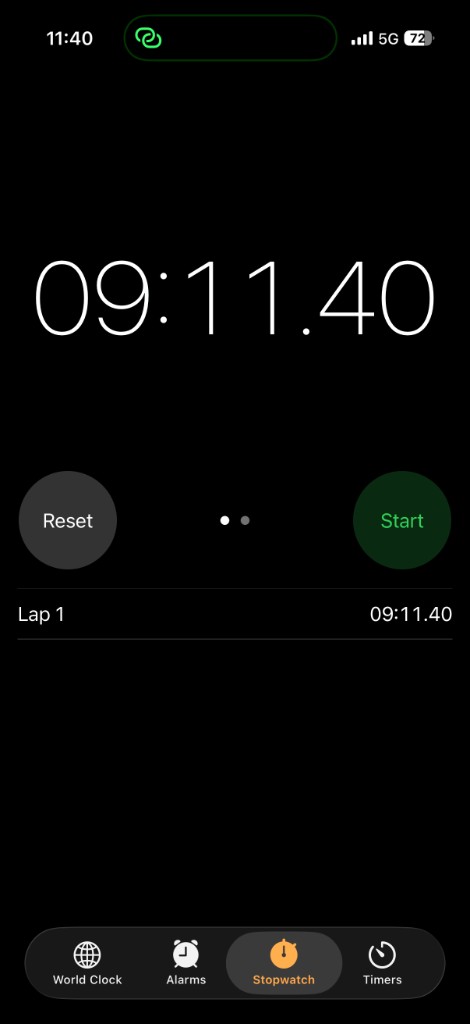
9 min 11 sec end-to-end · ~2 min saved Sample clip: Competing against big tech salary offers
Opus Clip
11:08
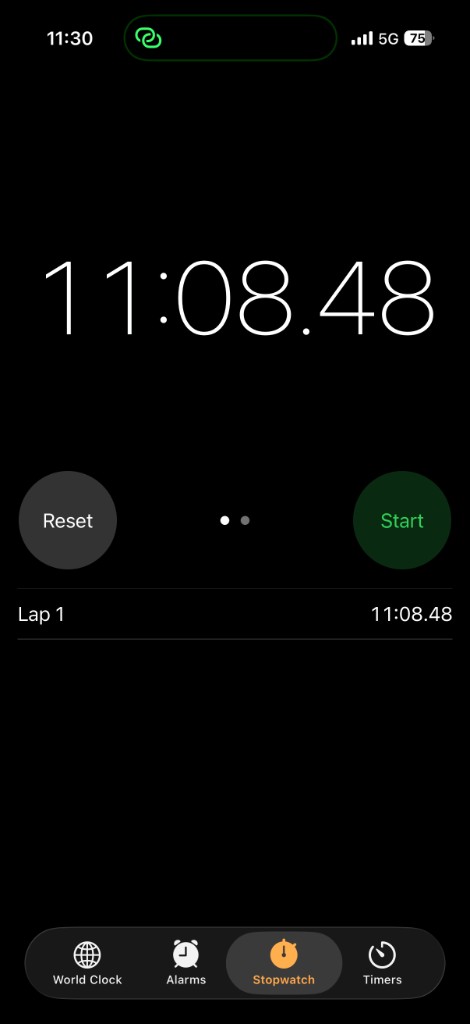
11 min 8 sec end-to-end Sample clip: CROs Earning Millions: The New Executive Pay
18% faster end-to-end on the same podcast (9:11 vs 11:08, timed May 2026).
From clips to published posts
Both tools find hooks quickly. The gap shows up in what happens after the AI finishes — especially if you still export MP4s and post manually.
Opus Clip optimizes for speed to clip suggestions. Choppity optimizes for speed to published posts with analytics. If you already pay for an editor and scheduler elsewhere, Opus Clip's lower entry price can make sense. If you want one tab from upload to analytics, Choppity closes the loop.
Choppity workflow
- Upload — paste a YouTube link or drag-and-drop (up to 120 minutes)
- Customize — set clip duration, caption style, magic reframe, and custom AI criteria
- Review clips — browse suggestions sorted by virality, trust, sales, or inspire
- Edit in transcript editor — trim, cut filler words, censor profanity, add B-roll from text
- Post or schedule — publish to TikTok, Instagram, YouTube Shorts, and LinkedIn in one tab
- Track performance — view impressions, likes, and shares; plan next clips on the Ideas Board
Typical result: ~45 minutes from upload to three scheduled posts — all inside Choppity.
Opus Clip workflow
- Upload — paste a link or upload a file (credit-limited by plan)
- Wait for analysis — AI transcribes, scores clips, and generates captions
- Sort by Clip Score — pick the highest-scored suggestions first
- Light editing — adjust trim points, tweak captions, add AI B-roll on Pro
- Export — download MP4s or use limited scheduling on higher tiers
- Manual upload — open each platform separately unless you already pay for a scheduler
Typical result: ~11 minutes to clips, then ~35 more minutes exporting and uploading — or add a separate scheduler subscription.
Who should choose Choppity
- You want one tool from upload to published post. Native posting, scheduling, and analytics replace export-and-manual-upload across four apps.
- You edit clips after AI generates them. The transcript-native editor saves hours vs Opus Clip's light touch-ups.
- You need content planning, not just clipping. The Ideas Board and Calendar integrate clip folders with your broader pipeline.
- You want control over what AI finds. Custom AI criteria let you instruct analysis with natural language before it runs.
- Credit math frustrates you. Hour-based Starter pricing ($20/mo for 3 hours) is easier to predict than 150 Opus credits.
Who should choose Opus Clip
- Speed is everything and you already have a posting workflow. Clip Score sorting plus $15/mo Starter gets you clips fast if you export elsewhere.
- Virality scoring is your primary filter. Opus Clip's Clip Score remains the category benchmark for sorting suggestions.
- You want AI B-roll without stock-footage hunts. Pro-plan B-roll adds visual variety automatically.
- Budget is tight and you clip short videos. At $15/mo with 150 credits, Opus costs less if monthly volume stays under 2.5 hours.
- You're comparing the full field. See our best Opus Clip alternatives roundup for 12 tools tested side by side.
What will Choppity cost for your workflow?
Enter your monthly upload volume to see which Choppity plan fits.
Why creators leave manual tools and never go back
Switched from expensive manual editing
“In the past I tried to get my YouTube video editor to create mass amounts of short-form content, but they struggled. Economically it did not make sense. Choppity has been an incredible asset in scaling up my short-form reach. ALL the clips automatically clipped, styled, and ready to publish.”
Scaled clip output without adding headcount
“Since we started using Choppity, our socials have seen a 4x increase in overall views across our channels. Love the non-stop product updates as well.”
Replaced a fragmented clip + schedule workflow
“A few weeks ago we started using Choppity. It identifies the moments in a 60-minute episode that are actually captivating, handles captions, formats for different platforms, reframes automatically, and you can post or schedule directly from there. Suddenly the bottleneck was not editing anymore.”
Still on the fence? Start here.
The biggest competitor is not Opus. It is inertia. These are the questions switchers ask before they commit.
Will the AI quality be as good as Opus Clip?
For most long-form content (podcasts, interviews, YouTube videos, webinars), Choppity matches or exceeds Opus on moment detection, especially for nuanced conversation. Where Choppity pulls ahead is flexibility: clip objectives beyond raw virality, custom AI prompts, and transcript-based editing to fix any clip in seconds.
Do I have to relearn how to edit all over again?
No. If you have used Opus, Descript, or any transcript-based editor, Choppity will feel familiar, often faster. Edit video by editing text, tweak caption styles, adjust timing, and schedule without learning a new timeline paradigm.
Is Choppity really cheaper than Opus?
On Starter, Opus is $15/mo and Choppity is $20/mo, but Opus gives 150 processing minutes (credits) while Choppity gives 3 hours (180 minutes). Use the calculator above with your monthly upload volume to see which Choppity plan fits.
What about Opus's virality score? Does Choppity have that?
Choppity ranks clips by engagement potential and lets you filter by clip objective: viral hooks, trust-building moments, sales-ready segments, and more. You get multiple ranked lists instead of betting everything on one score.
Does the Choppity scheduler actually work?
We maintain a 98%+ publish success rate across TikTok, Instagram Reels, YouTube Shorts, LinkedIn, and Facebook. When a post fails, retrying is one click.
How fast can I switch from Opus?
Under 2 minutes. Paste a YouTube URL below, create a free account, and Choppity starts generating clips immediately. No credit card required.
Does Opus Clip have a transcript editor?
Opus Clip offers limited post-generation editing — basic trim adjustments and caption tweaks. It does not match Choppity's transcript-native trim, cut, semantic search, filler-word removal, or profanity censor from text.
Can I post directly to TikTok from Choppity or Opus Clip?
Choppity supports native posting and scheduling to TikTok, Instagram, YouTube, and LinkedIn from within the app. Opus Clip offers limited scheduling on higher tiers; most users export MP4s and upload manually or use a third-party scheduler.
What is Opus Clip's Clip Score?
Clip Score is Opus Clip's AI virality rating (0–100) for each suggested clip. It analyzes speech patterns, pacing, and hook strength. It is useful for sorting fast — though lower-scored clips sometimes outperform higher-scored ones in practice.
Does Opus Clip have AI B-roll?
Yes — on Pro plans ($29/mo). It inserts relevant stock-style footage during talking-head segments. Choppity does not generate AI B-roll but supports manual B-roll upload in the transcript editor.
Which tool is better for podcast clipping?
Choppity edges ahead for podcast workflows with custom AI criteria, multi-speaker face tracking, profanity censor, and native posting to all major platforms. Opus Clip is strong if you only need virality-ranked suggestions and already have a separate posting stack.
Import your first video free
Paste a YouTube link. Use the full editor and scheduler before you spend a dollar. Switch from Opus in under 2 minutes.
Looking at other Opus Clip competitors? See our full roundup of the best Opus Clip alternatives →
Explore more comparisons and tools
Best Opus Clip Alternatives
12 ranked alternatives tested with the same video
Vizard Alternative
Compare Choppity vs Vizard for long-form clipping
YouTube Clip Generator
Paste a YouTube URL and AI finds your best clips
Podcast Clip Generator
Turn episodes into shareable shorts
Choppity Pricing
Hour-based plans from $20/mo
Best AI Clip Makers
Full comparison vs Opus, Vizard, and more