

YouTube Clip Generator — AI Finds Your Best Moments Automatically
Free YouTube clip generator. Paste any YouTube URL and AI finds 30+ viral-ready clips with animated captions, 9:16 reframing, and direct posting to Shorts, Reels, and TikTok.
Processing…
This will only take a moment…
How to use this tool
Paste a YouTube link
Drop in any public YouTube URL — watch pages, Shorts, or youtu.be links. No download required; we pull and analyse the video automatically.
AI finds your best moments
Our AI transcribes at 95%+ accuracy, then scores every segment for hooks, emotional peaks, complete story arcs, and viral potential — not random interval cuts.
Review 30+ clip suggestions
Browse AI-ranked clips with transcript previews. Tweak timing in the text editor, pick caption styles, and select which clips to export.
Export or post to Shorts, Reels & TikTok
Download captioned 9:16 MP4s or publish and schedule directly to YouTube Shorts, Instagram Reels, TikTok, Facebook, and LinkedIn from one workspace.
How it works
How to clip a YouTube video with AI
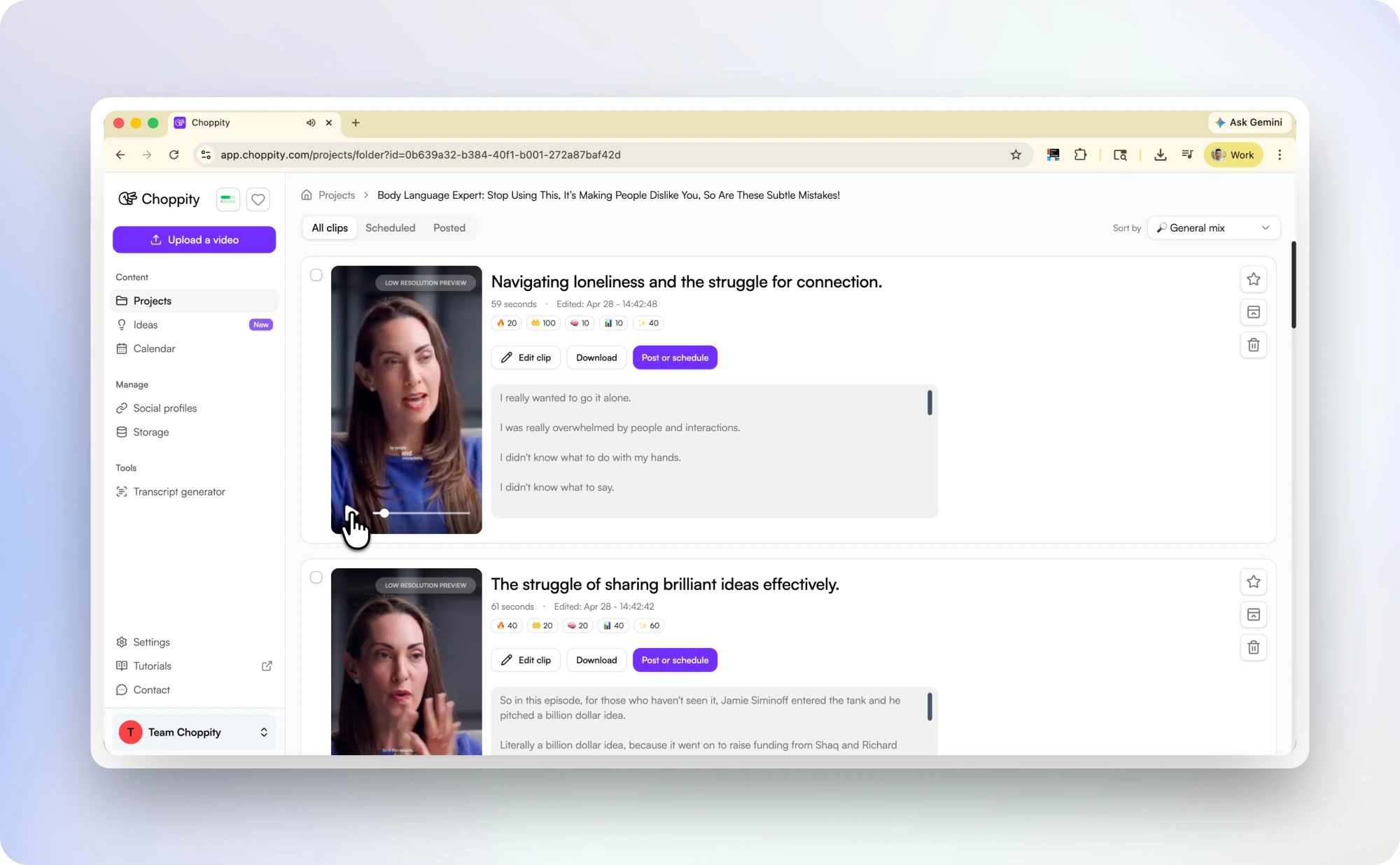
Paste any YouTube URL and Choppity handles the rest. We download the video, generate a full transcript, and scan every sentence for clip potential — bold claims, surprising stats, personal stories, heated exchanges, and laugh-out-loud reactions.
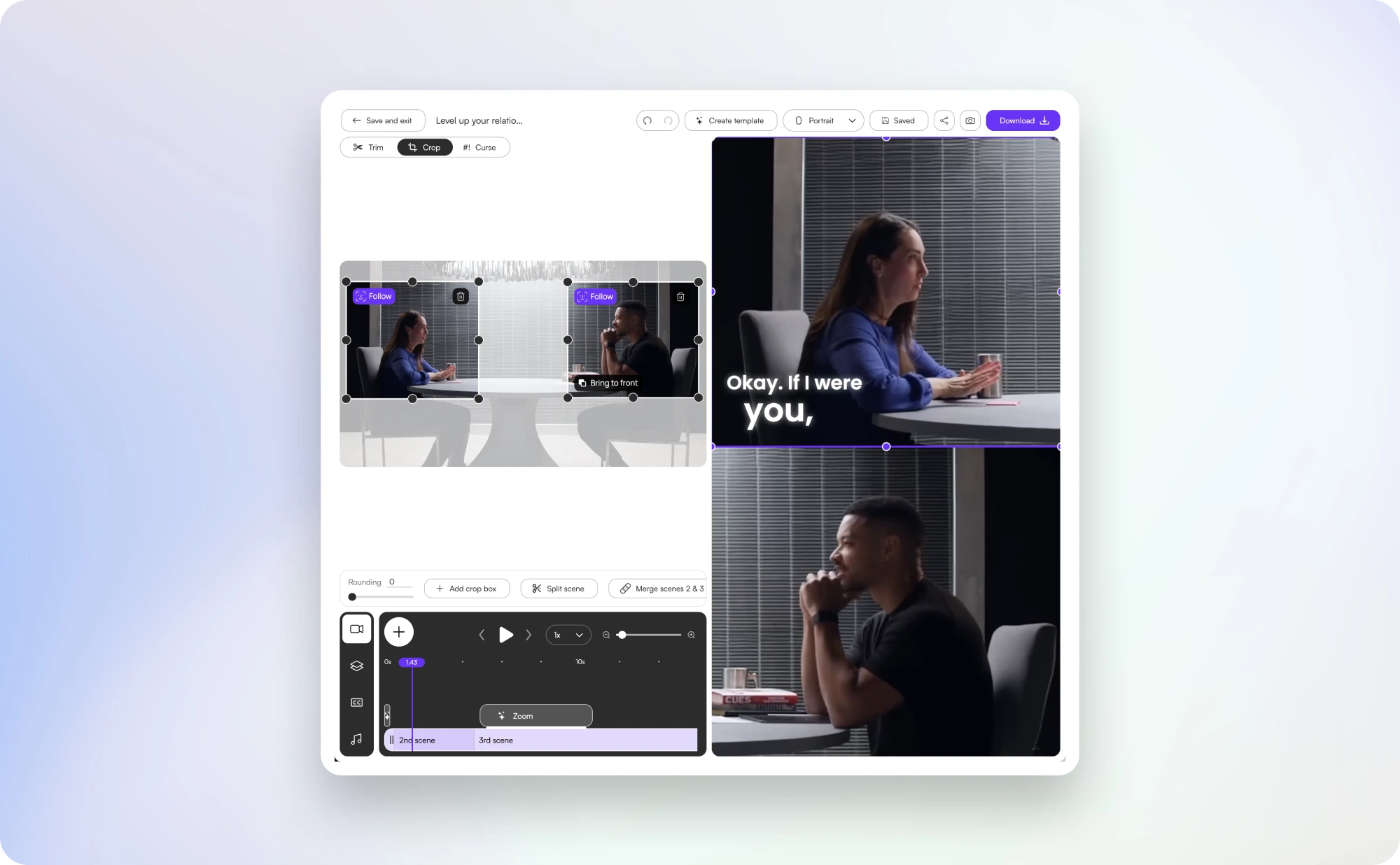
Each clip is trimmed to a complete thought (never mid-sentence), reframed to 9:16 with AI speaker tracking, and styled with animated word-by-word captions. A typical hour-long YouTube video yields 30+ ready-to-post clips in 10–15 minutes.
AI detection
How Choppity finds moments OpusClip misses
Generic clip tools optimise for one signal: loud moments. Choppity evaluates speech content, tonal shifts, narrative completeness, and clip objectives tuned for both virality and trust-building.
The result is clips that hook in the first second, deliver value quickly, and end on a satisfying note — the formula that drives completion rate on Shorts, Reels, and TikTok.
You stay in control. Review every suggestion, refine timing by editing the transcript, and export only the clips you want. The AI handles the tedious scrubbing; you make the creative calls.
Multi-platform
Clip YouTube videos for Shorts, Reels, TikTok & more
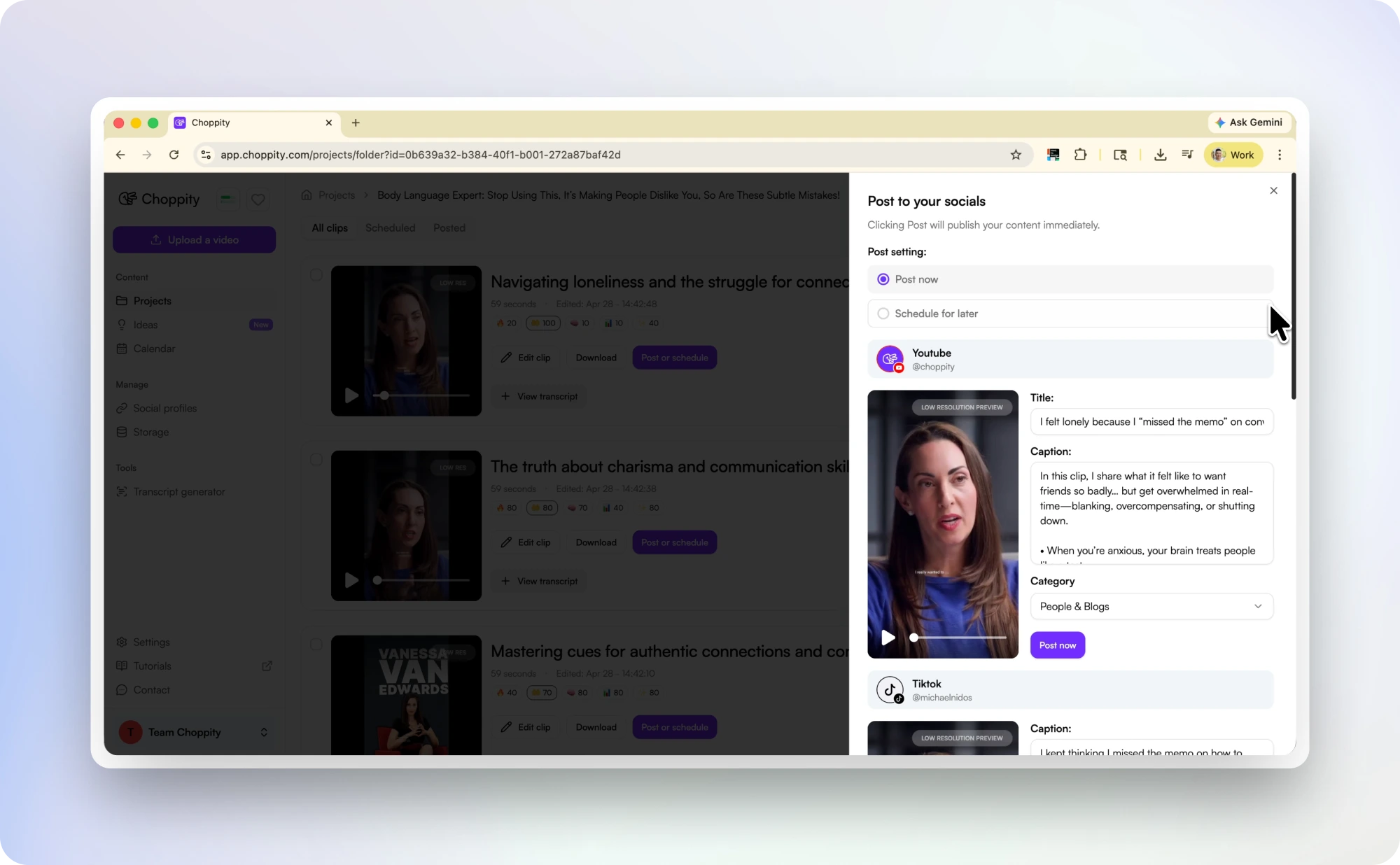
One YouTube upload can fuel a week of social content. Choppity exports each clip in 9:16 vertical at up to 1080p with captions positioned inside platform safe zones.
Post or schedule directly from Choppity to YouTube Shorts, TikTok, Instagram Reels, Facebook Reels, and LinkedIn — no downloading and re-uploading across five apps.
Need Shorts-specific hook detection? The YouTube to Shorts converter applies the same AI with Shorts-first framing. Podcast episodes? Try the Podcast Clip Generator.
Compare
Choppity vs OpusClip for YouTube clipping
Opus Clip built the category — paste a YouTube link, get AI clips. Choppity matches that workflow and adds what most clippers skip: clip objectives beyond raw virality, profanity censoring for brand-safe exports, text-based transcript editing, and direct scheduling without a third-party tool. See the full Opus Clip alternative comparison for pricing and side-by-side metrics.
| Choppity | Opus Clip | |
|---|---|---|
|
Recommended
Clips per upload | 30+ ranked by objective | Varies; viral-score model |
| YouTube URL paste | Yes | Yes |
| Animated captions | Included, customisable | Included; deeper styles on paid |
| Direct social scheduling | TikTok, Reels, Shorts, LinkedIn, Facebook | Limited integrations |
| Profanity censor | Auto-bleep built in | Not available |
| Transcript editing | Edit video by editing text | Basic |
| Free tier | 1 hr/month, no watermark on trial clips | Watermarked free tier |
Comparison based on publicly listed features as of May 2026.
More clipping tools
Manual trims, AI clip finders, captions, and scheduling — pick the right tool for your workflow.
YouTube to Shorts Converter
Shorts-first AI hook detection and 9:16 export.
Podcast Clip Generator
Hour-long episodes → 20–40 viral shorts.
Free AI Clip Maker
The main AI clipping tool for any long video — not just YouTube.
Free Video Caption Generator
Add animated burned-in captions to any clip.
Social Media Video Scheduler
Schedule clips to TikTok, Reels, Shorts, and more.
Try our AI video editing platform
At Choppity we help content creators turn long videos into viral short clips. We use AI to automatically identify highlights, add animated captions, and optimize content for each social platform.
Try it for freeThese podcasters, creators, content teams and founders said yes, look what happened
Here's what happened when you stop trying tools or dabble with video editors and start using Choppity.
"In the past I've tried to get my YouTube video editor to create mass amounts of short-form content, but they struggled. Choppity has been an INCREDIBLE asset in scaling up my short-form video reach."
Michael W.
YouTuber & Designer
"Since we've started using Choppity, our socials have seen a 4x increase in overall views across our channels. Love the non-stop product updates as well."

Vaibhav
Founder, SmartLead.ai
YouTube Clip Generator — AI Finds Your Best Moments Automatically FAQs
Common questions about this tool and how it works
What is a YouTube clip generator?
A YouTube clip generator uses AI to analyse a long YouTube video and automatically create short, shareable clips. Paste a URL, and Choppity finds the best moments, adds captions, reframes to vertical, and exports clips ready for Shorts, Reels, and TikTok.
Can I clip any YouTube video?
Any public YouTube video works — paste a standard watch URL, Shorts link, or youtu.be short link. You can also upload MP4, MOV, or WebM files directly if you already have the file.
How many clips does it generate from one YouTube video?
Typically 20–40 clips from a 60-minute video, depending on content density. Shorter videos yield fewer but higher-quality suggestions. Every clip is ranked so you can start with the top performers.
Does it work for YouTube Shorts specifically?
Yes. Clips export at 1080×1920 in 9:16 format with captions inside YouTube's safe zones. You can also use the dedicated YouTube to Shorts converter for Shorts-first hook detection.
Is the YouTube clip generator free?
Yes — paste a link and generate clips on the free plan. Paid plans unlock watermark-free exports, longer uploads, bulk processing, and direct social scheduling.
How does Choppity compare to Opus Clip for YouTube?
Both accept YouTube URLs and generate AI clips. Choppity adds clip objectives for trust-building content, built-in profanity censoring, transcript-based editing, and direct multi-platform scheduling — without watermarking the free tier as aggressively.
Learn more about captions & subtitles
Guides, tutorials, and platform deep-dives from the Choppity blog.
Opus Clip Alternative
Switch from Opus — 30+ clips, hour-based pricing, native scheduling.
11 Best YouTube Clip Makers in 2026
Full comparison of every AI clip tool for YouTube creators.
How to Clip YouTube Videos
Five proven methods — AI generator vs manual trimmer.
Best AI Clip Generators
See how workflows stack vs Opus, Vizard, and more.
More free tools
Animated Subtitles Generator (Free Animated Captions Tool)
Create stunning animated subtitles for your videos instantly. Our free animated subtitles generator adds eye-catching motion effects.
Try freeAdd Subtitles to Video for Free
Add subtitles to video online free with our AI subtitle generator. Upload any video and get accurate subtitles in seconds.
Try freeFacebook Reel Caption Generator (Add Captions Facebook Reel - Free Tool)
Add captions to your Facebook Reels instantly with our free AI tool. Upload any video and get perfectly formatted captions in minutes.
Try freeFree Facebook Video to Transcript Generator
Convert any Facebook video to text instantly. Upload your video or paste a link to get an accurate transcript. Free.
Try freeFree Video Caption Generator - Add Animated Subtitles & Captions to Videos with AI
Upload your MP4 or MOV, pick a caption style and transitions, and our AI automatically adds animated subtitles to your video. Download the finished MP4 or post straight to socials. 100% free.
Try freeHormozi Caption Style Generator - Free Alex Hormozi Subtitles
Generate Alex Hormozi-style animated captions for your videos instantly. Free tool. Get viral Hormozi caption style now!
Try free