



01
Start with your video.
Drop a YouTube link or direct video-file URL into your conversation. Ask Choppity to turn the best moments into short clips.
One video. More content.INTRODUCING CHOPPITY MCP
Your video. Your AI assistant. Your next batch of clips.
Bring Choppity into the conversation and make it happen.
For workspace owners on a paid Choppity plan.
IT STARTS WITH A SIMPLE ASK
Turn this webinar into up to 5 vertical clips using our brand template: [video URL]. Show me the clips when they’re ready.
Choppity takes it from here.
YOUR FAVOURITE ASSISTANT. NOW WITH CHOPPITY.
Available through compatible remote MCP clients.FROM A LONG VIDEO TO SHORT CLIPS
Keep the conversation going. Let Choppity find the moments worth sharing.
Drop a YouTube link or direct video-file URL into your conversation. Ask Choppity to turn the best moments into short clips.
One video. More content.Tell your assistant what to look for, the clip length and the format you need. Apply your saved brand template and caption style.
Your format. Your brand.Get previews and editor links for your generated clips. Open them in Choppity to review the results and make your final edits.
You have the final say.FROM YOUR CHAT TO YOUR WORKSPACE
Your assistant gets the clips started. Choppity gives you the space to review them, fine-tune the details and make them yours.
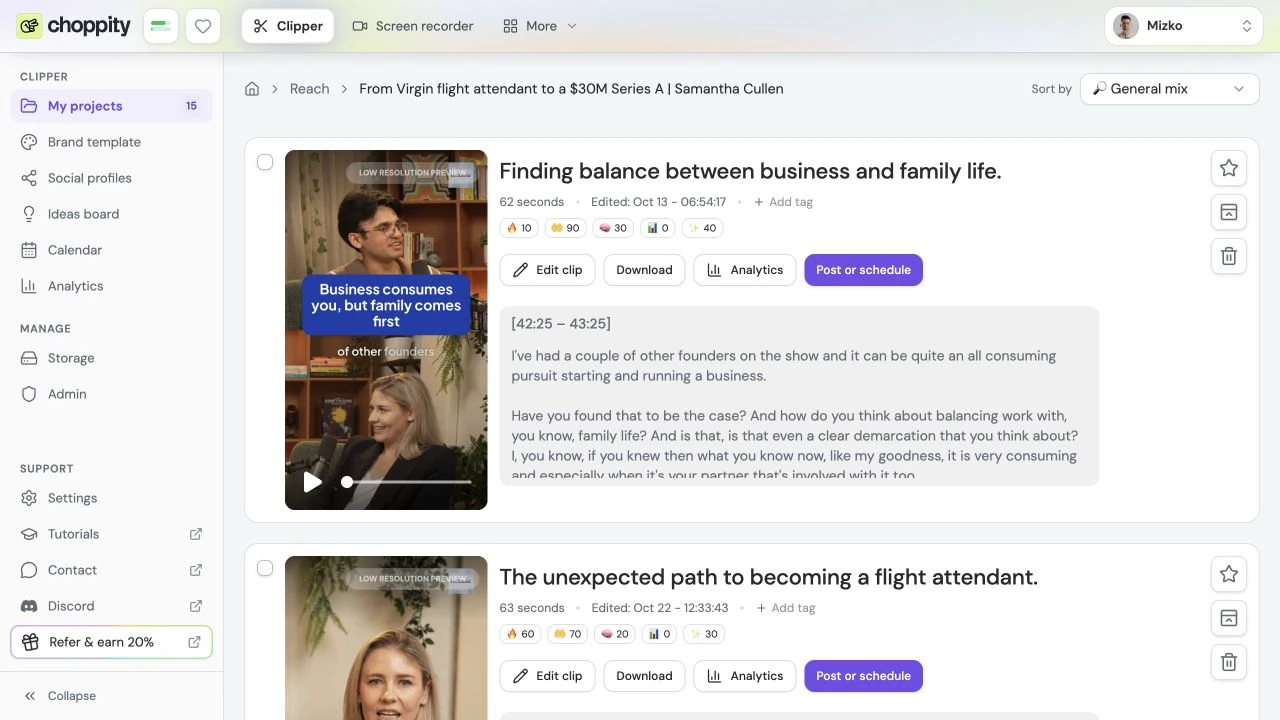
Review and edit your generated clips in Choppity.
LET’S GET YOU CONNECTED
Add Choppity to your AI assistant. Your next video is the starting point.
Your connection to clip creation
Sign in with Choppity where supported, or use an API key from Settings → API.
Full setup instructionsFollow its setup guide to add a remote MCP server or custom connector.
Paste the server URL and sign in as an owner of your paid Choppity workspace.
Share a video link and describe the clips you want. Choppity takes it from there.
New to Choppity? Create an account and choose a paid plan.
A FEW MORE DETAILS
MCP stands for Model Context Protocol. It connects a compatible AI assistant to Choppity so you can make clips from your conversation. Share a video link, describe the clips you want and get previews with links to open them in Choppity.
You must be an owner of a paid Choppity workspace. Connect with Choppity sign-in in clients that support MCP authorization, or use a Choppity API key. Your AI assistant must support remote MCP servers; availability may depend on its plan or administrator settings.
Yes. Ask your assistant to use a saved template from your Choppity workspace. You can also specify a caption style, clip format, target length and the kinds of moments you want it to find.
Yes, if your assistant has terminal access. It can upload your file and then generate clips. For assistants without terminal access, use a YouTube link or a direct video-file URL.
Your assistant can return clip previews and links to the Choppity editor. Open those links to review your clips and make detailed timeline edits in Choppity.
Yes. Clip generation uses your workspace’s analysis allowance. MCP does not include a separate or unlimited clip-generation allowance.
Building a custom integration? Explore the Choppity API
LESS FRICTION. MORE CLIPS.
Make your next batch of clips with a simple ask.
Connect your assistant Looking for a workflow for your team? Explore Enterprise