What if you could generate more clips, spend less time editing, and manage your short-form content in one place? That's what makes Choppity an interesting Vizard AI alternative.
And we're not just claiming all this without evidence. We actually put both platforms to the test by clipping the same 54-minute video and comparing the results.
Spoiler alert: Choppity generated 28 clips, while Vizard AI produced only 5. That's 5.6 times as many clips from the exact same video!
We also compared clip quality, ease of use, editing features, branding, and pricing to help you decide which platform is right for you.
So is Choppity really the better choice? Let's find out.
Choppity vs Vizard AI: Quick Comparison
Feature | Choppity | Vizard |
|---|---|---|
Why not put Choppity to the test yourself? Create a free account and discover how it handles your content.
How We Tested Choppity and Vizard AI
How can you tell which AI video clipper actually performs better? One way is to give both platforms the same video and compare what they produce.
That’s what we did for this Choppity vs Vizard AI comparison.
We uploaded the same 54-minute episode of the Women's Nutrition Podcast, featuring Dr Faye Bate and Dr Hazel Wallace, and generated clips from it.
We picked this episode specifically for two reasons: first, it features two speakers, and second, they're having an educational discussion covering different aspects of women's health and nutrition.
This allowed us to assess three important aspects of AI video clipping:
Accurate speaker tracking
Reliable automatic captions
And the ability to extract coherent, self-contained clips from longer conversations.
Here's what we did step by step:
Step 1: We set up the brand templates
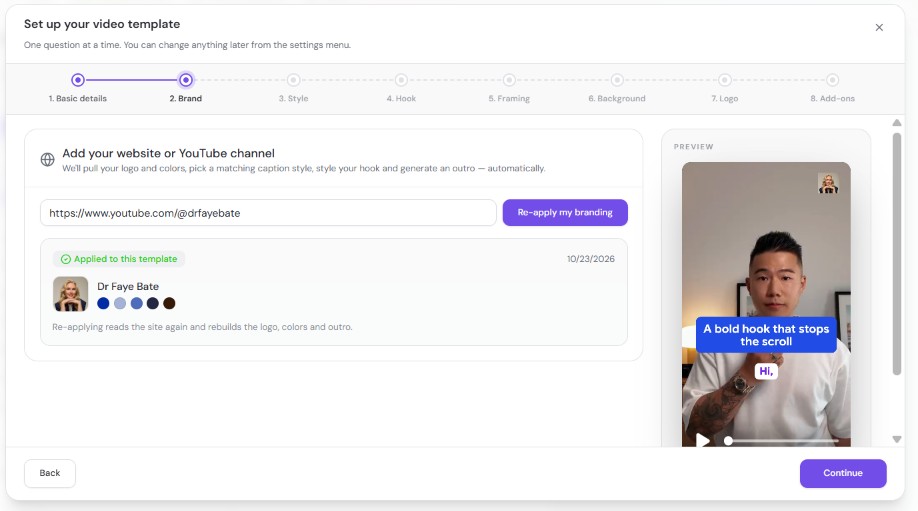
We used Choppity's Brand Template Wizard, which automatically pulled the logo, brand colors, caption styles, hook formatting, and audience details just from pasting the YouTube channel's link!
Vizard AI also offers a Brand Kit, where you can manually upload your logo, customise brand colours and fonts, and save reusable branding templates.
Step 2: We used the same video and custom AI instructions.
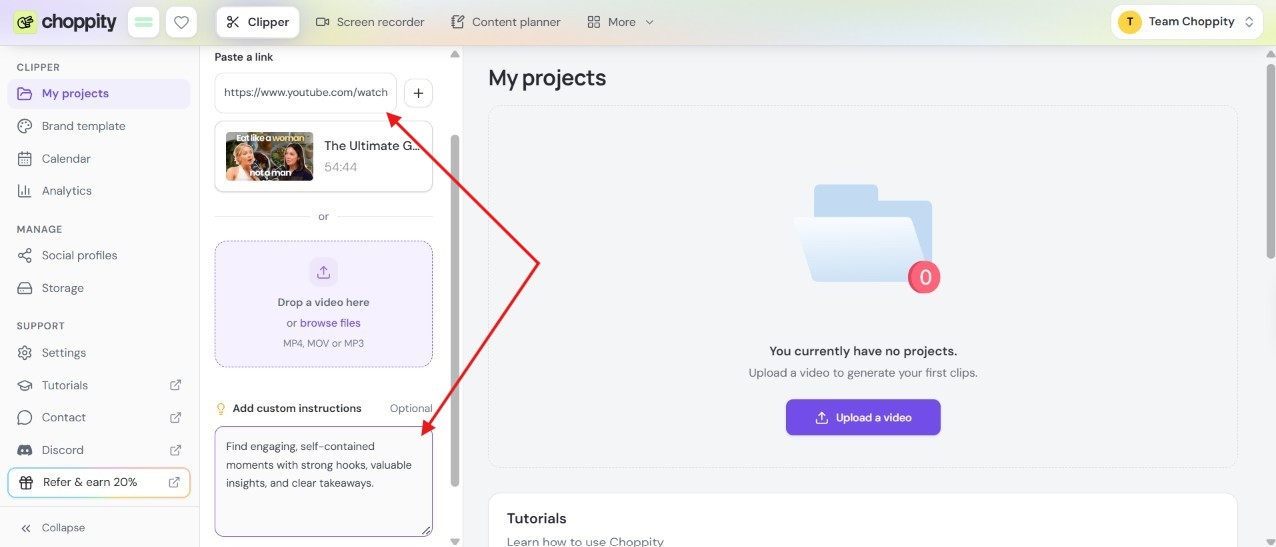
We pasted the link to the podcast into both platforms and entered the following prompt to guide AI clip generation:
"Find engaging, self-contained moments with strong hooks, valuable insights, and clear takeaways."
Here’s how that looks on Choppity:
Step 3: We configured the clip-generation settings.
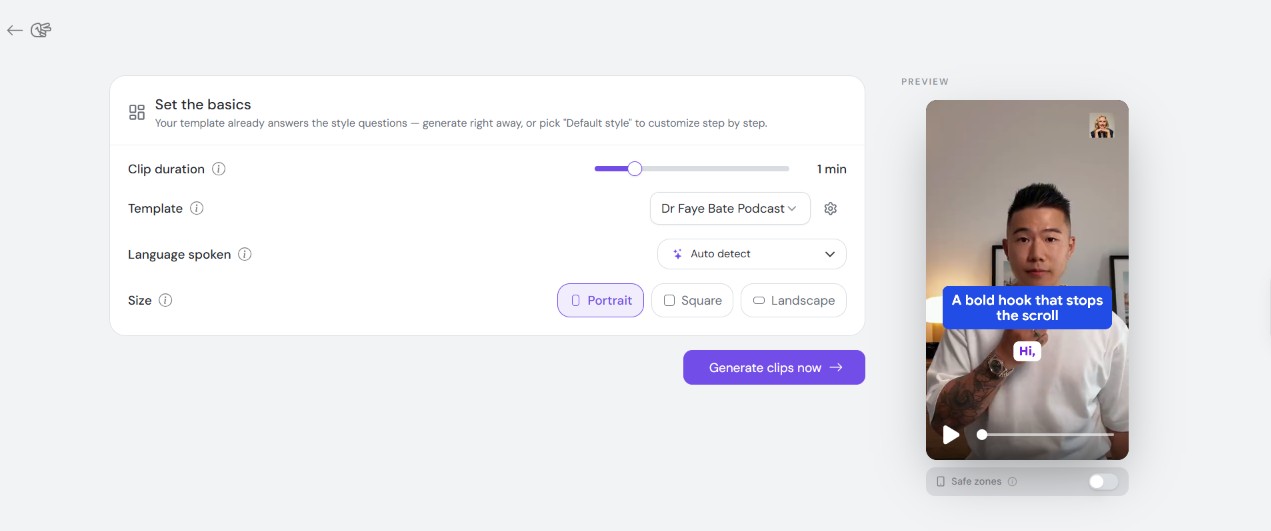
We set both platforms to generate vertical (9:16) clips of approximately 1 minute.
We tested Vizard AI using its V1 clipping model because it is advertised as an option for generating more clips.
Step 4: We measured the clip-generation results.
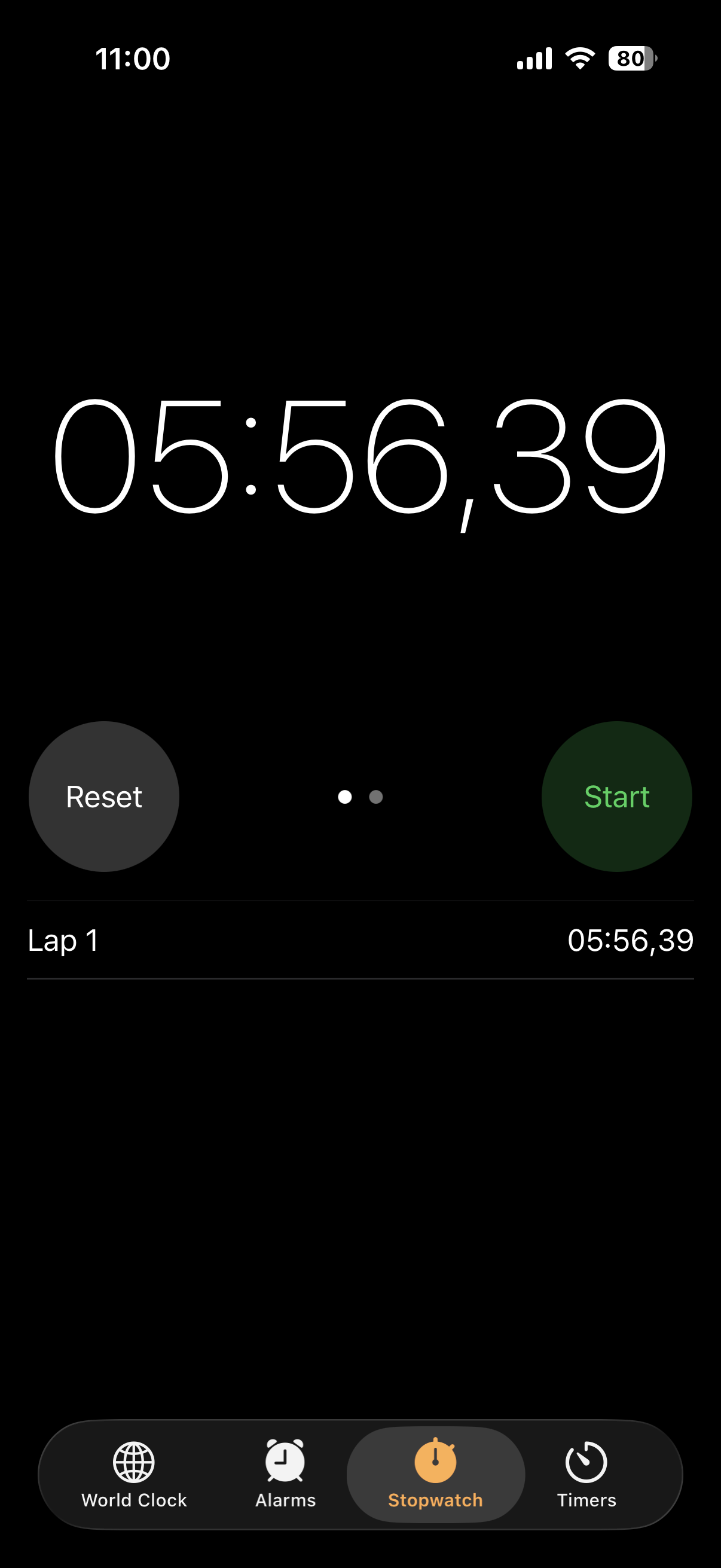
This was the most exciting part. We used the Stopwatch on our mobile phone to record exactly how much each platform would take to generate clips from that 54-minute podcast.
Choppity was easier to time because we only needed to click on one single button and wait. After 5 minutes and 56 seconds, all the clips were available. So one click included both video upload and AI clip generation.
As for Vizard AI, we needed to time it twice:
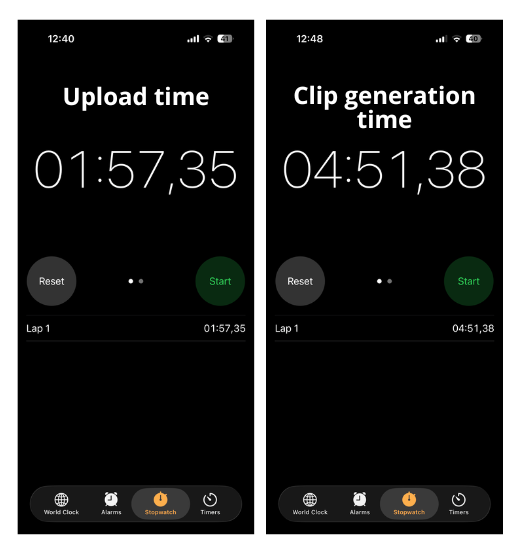
First timer for video uploading: 1 minute and 57 seconds.
Second timer for the AI clip generation: 4 minutes and 51 seconds.
So, Vizard AI takes you through two separate stages before you see your clips.
The total wait for Vizard AI was approximately 6 minutes and 49 seconds.
Step 5: We reviewed the generated clips and editing tools.
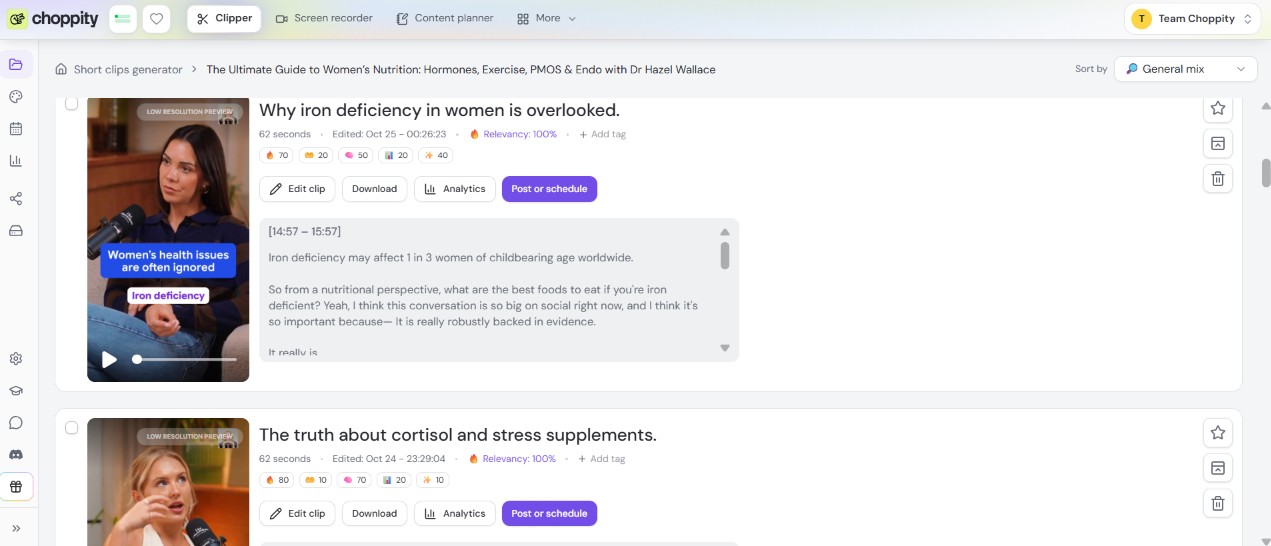
After generating the clips, we watched some of them, especially the ones that were scored high, and we evaluated their opening hooks, content relevance, context, natural endings, caption accuracy, and automatic speaker framing.
We also used the video editors to edit some clips and evaluate their usability, transcript editing, branding options, and B-roll capabilities.
Step 6: We explored the additional features and support options.
Of course, we didn't stop at AI clipping. We also tested the screen recorders, explored the scheduling features, and checked what kind of support each platform offers.
Clip Generation Speed and Quality
The whole point of using an AI video clipper is to generate short clips from a long-form video or podcast in minutes.
But what's the point of generating clips in minutes if you have to spend hours fixing them afterwards?
Speed isn't everything. The quality of the clips and how close they are to being publish-ready is also important.
Let's find out how Choppity and Vizard AI performed.
Which AI Video Clipper Generated Clips Faster?
Quick answer: the fastest clipper in our test is Choppity.
After clicking the "Generate short clips" button, we only had to wait 5 minutes and 56 seconds for Choppity to generate all 28 clips.
Vizard AI, on the other hand, took approximately 6 minutes and 49 seconds to upload the same video and generate 5 clips.
That's a difference of 53 seconds in Choppity's favour, even though Choppity generated significantly more clips!
There's one small detail worth pointing out about these results.
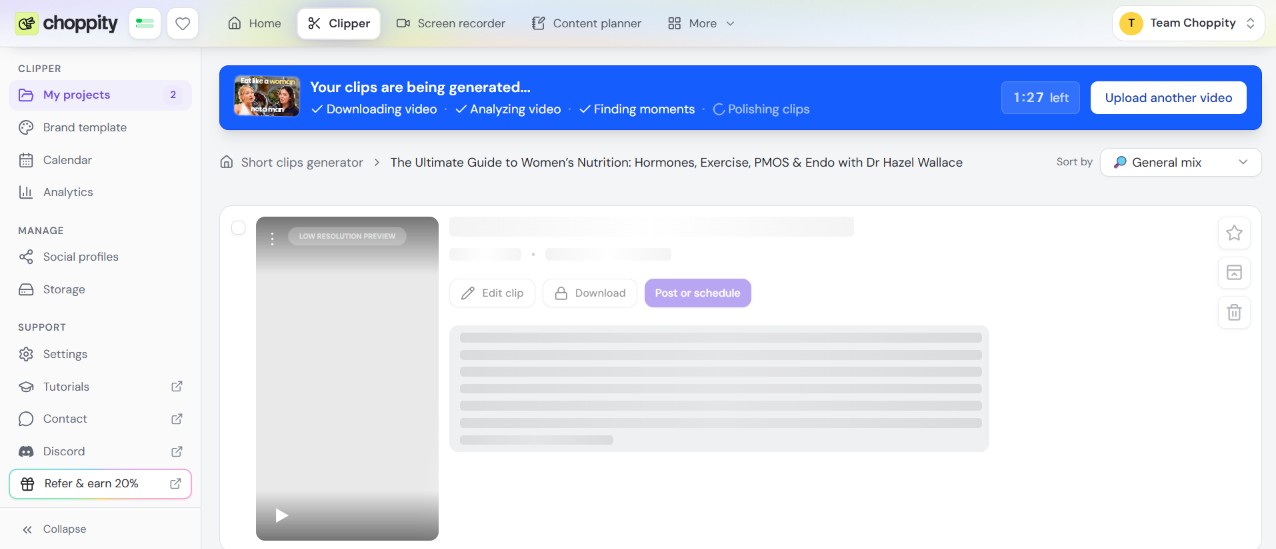
Choppity handled everything in one go, so we only needed one stopwatch. It downloads the video, analyses its content, finds the best moments, and polishes the clips, all in one process. The blue progress bar shows you exactly what the AI is doing at each stage.
Vizard AI, on the other hand, had two separate stages: uploading the video, which took 1 minute and 57 seconds, and generating the clips, which took another 4 minutes and 52 seconds.
Which Platform Generated More Usable Clips?
Choppity generated more clips than Vizard AI, so it gave more clips to choose from.
To assess if a clip was really usable, we looked beyond the visuals and paid attention to the opening hooks, context, endings, caption accuracy, and speaker framing.
Here's how both platforms performed.
Choppity's Results
Choppity generated 28 clips from the podcast. We reviewed 21 of their transcripts and watched ten of the generated videos.
And we have to say, there were quite a few promising results!
What we liked:
Choppity picked out several interesting moments about cortisol supplements, cycle syncing, exercise, and women's hormonal health.
Some clips had scroll-stopping hooks that would pique someone's curiosity, such as "Frozen foods can be healthier than fresh" and "Women's health issues are often ignored"
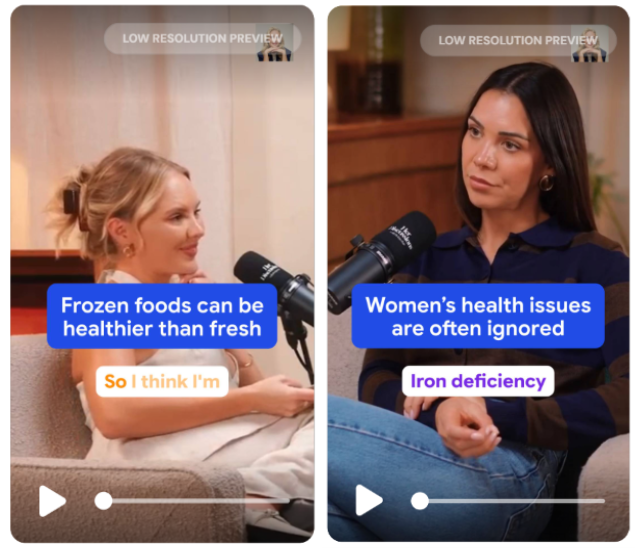
The automatic captions were generally accurate and matched what the speakers were saying correctly.
Speaker framing worked well, and it kept the person talking on screen as the conversation moved between Dr Faye Bate and Dr Hazel Wallace.
The downloaded clip we reviewed looked sharp, with consistent branding and caption styling.
What could be better:
Not every clip was ready to publish straight away.
For example, a clip about endometriosis started by referring to something mentioned earlier in the conversation.
The clip contained very useful information, it just needed a little editing to make sense on its own.
Overall, Choppity gave us a good selection of interesting moments, and the clips we watched looked polished. Still, some needed adjustments before they could be published.
Vizard AI's Results
Vizard AI generated 5 clips, and we watched every single one to see how they turned out.
What we liked:
Our favourite was a 51-second clip titled "What to Eat Before Your Workout", which received a virality score of 9.8.
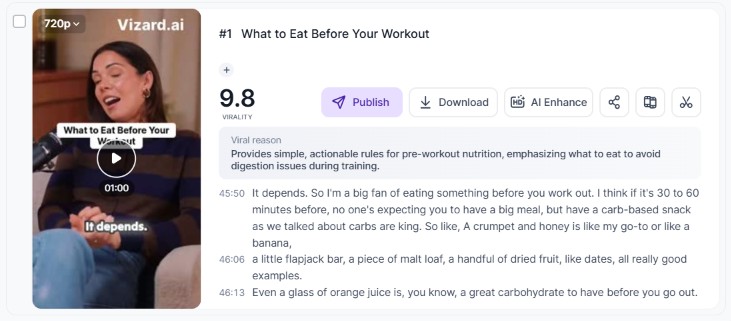
It stood out because it had pretty much everything we'd want from a short-form video: a clear beginning, useful information about pre-workout nutrition, a conversation that was easy to follow, and a takeaway that made sense.
In other words, you could watch it without needing to see the original podcast.
We also found that Vizard's automatic speaker framing worked well, keeping the active speaker visible throughout the clips.
What could be better:
Some of Vizard's clips started in the middle of a conversation, which made them harder to understand without context.
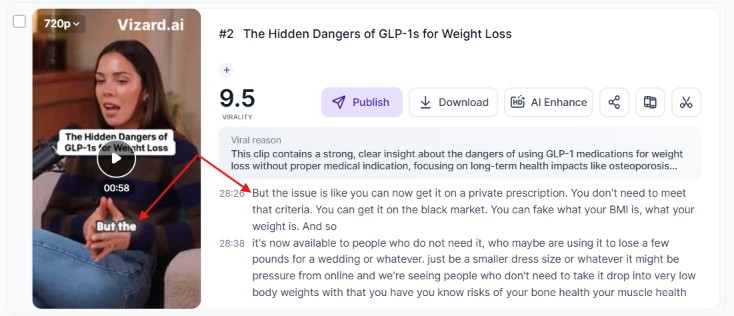
For example, a clip about GLP-1 treatments opened with "But the issue is", without explaining what issue the speaker was talking about.
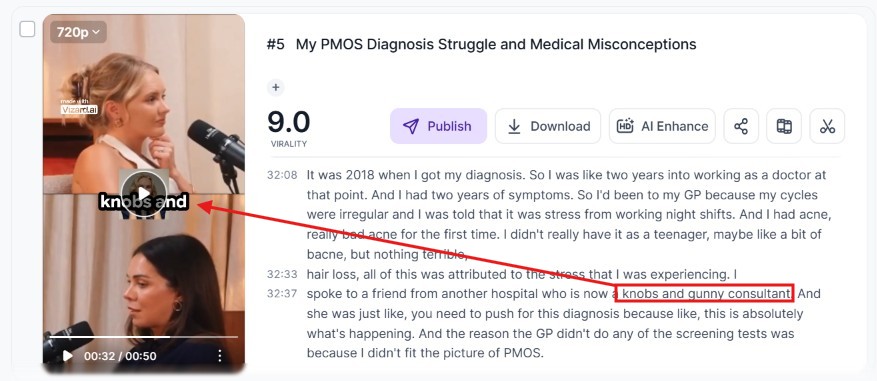
We also noticed a caption error in another clip. The speaker said "obs and gynae consultant", referring to a doctor who specialises in obstetrics and gynaecology, but Vizard transcribed it as "knobs and gunny consultant", which makes no sense.
Our Takeaway
Choppity gave us a much bigger selection of clips to work with, while Vizard AI produced only one particularly strong, self-contained clip among its five results - the other clips contained some errors in transcription and openings that lacked context.
AI Clip Scoring: Goals vs Virality Scores
Both AI clippers score their generated clips. The goal is to help you immediately figure out which one is worth publishing.
But they have different scoring systems. Let's take a look:
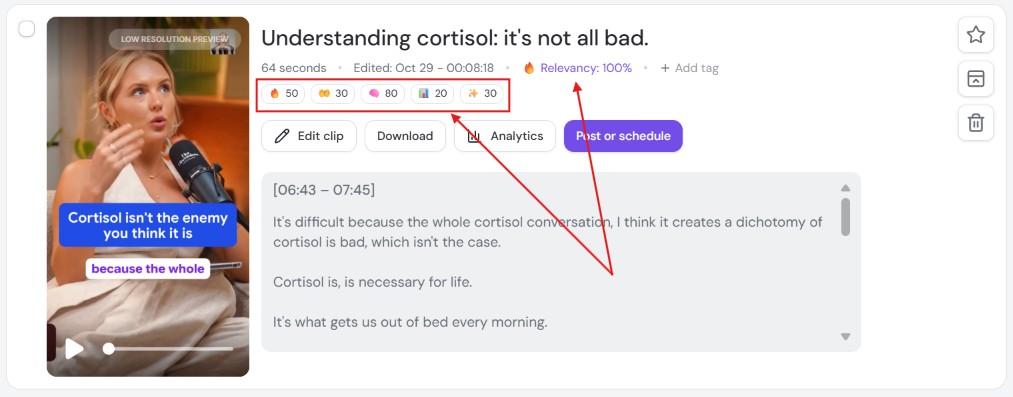
Choppity's Goal-Based Scoring
When sharing content online, we don't all have the same goal. Some people want to go viral, some want to build trust, share value, or even get sales as well.
That's why Choppity lets you sort your generated clips based on your content goals. It lets you choose:
More Views
Build Trust
Share Value
Get Sales
Inspire & Motivate
Alongside these goal-based scores, Choppity also gives each generated clip a relevance percentage based on how well it matches your custom AI instructions.
Vizard AI's Virality Scoring
Vizard only scores based on one goal: Virality.
It also gives you a "Viral reason" explanation, which tells you why Vizard thinks that particular moment could perform well.
However, there's something worth keeping in mind: a high virality score doesn't always mean a clip is ready to publish.
Remember the GLP-1 clip we mentioned earlier?
It received a score of 9.5, even though it started with "But the issue is" and didn't provide enough context for someone watching it on its own.
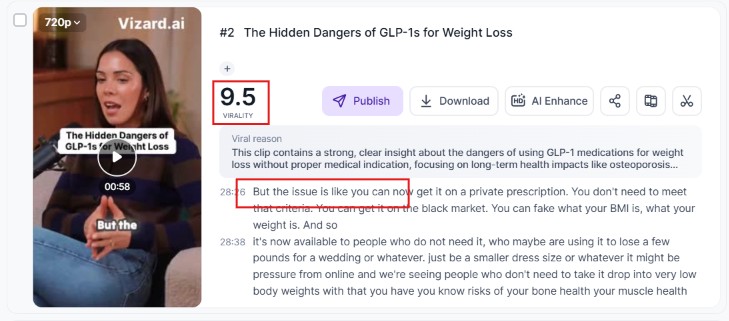
We had to use Vizard's Trim/Extend feature to fix the opening.
Which Scoring System Is More Useful?
We particularly liked Choppity's approach because it takes your content goals into account.
After all, a clip that's great for building trust with your audience isn't necessarily the same one you'd choose to promote a product.
Ease of Use and Customisation: Choppity vs Vizard AI
AI clippers exist to save you time. Not to make you spend hours figuring out how to use it. That's why ease of use is something we wanted to include in this comparison.
We looked at everything from uploading videos and setting up clips to customising branding, editing captions, and adjusting speaker framing.
Here's what we found:
Uploading Videos and Getting Started
Getting started was pretty easy on both platforms. But Choppity's clipper workflow was just more intuitive and straightforward without unnecessary extra steps.
Getting Started With Choppity
The first thing you see when you open Choppity's Clipper dashboard is the video upload area. You don't have to waste time figuring out where to start. It's prominent and easy to spot.
You can upload a video directly from your device or paste a link from platforms such as YouTube, Vimeo, or Google Drive.
There's also a field where you can enter custom AI instructions to tell Choppity what kind of moments you're looking for.
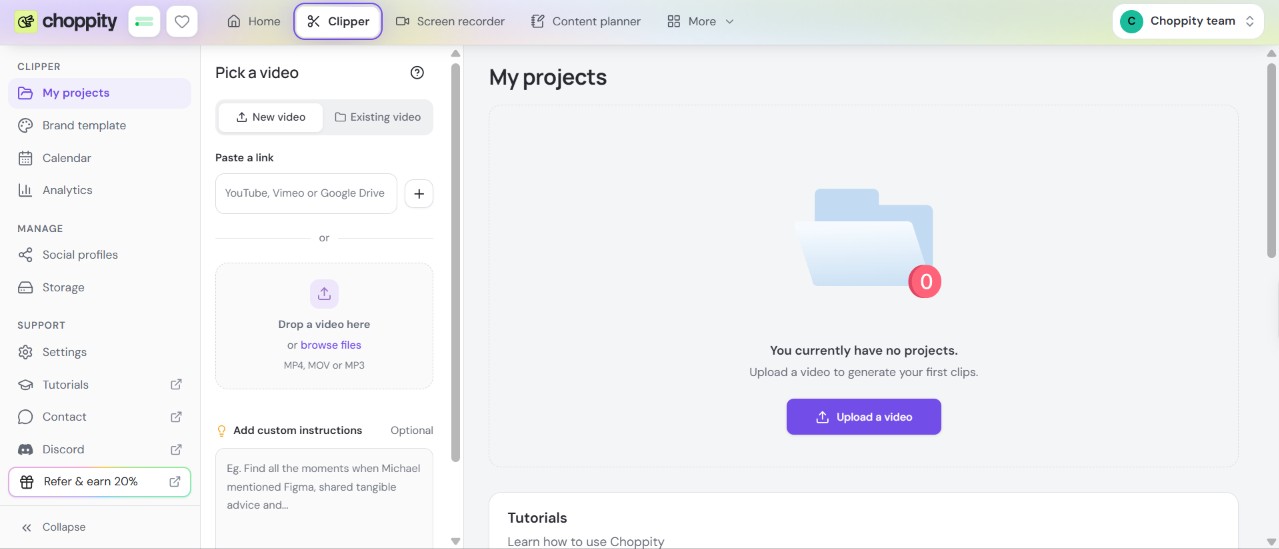
When you click on the Generate Short Clips button, Choppity will ask you to set the basics of your clipping needs, including clip duration, video format, language, and brand template.
Then, you can sit back and relax while Choppity uploads your video and generates your clips, all in one place.
Getting Started With Vizard AI
Getting started is also relatively simple on Vizard AI.
It also shows a central input field in the dashboard where you can paste your video link or upload it from your device.
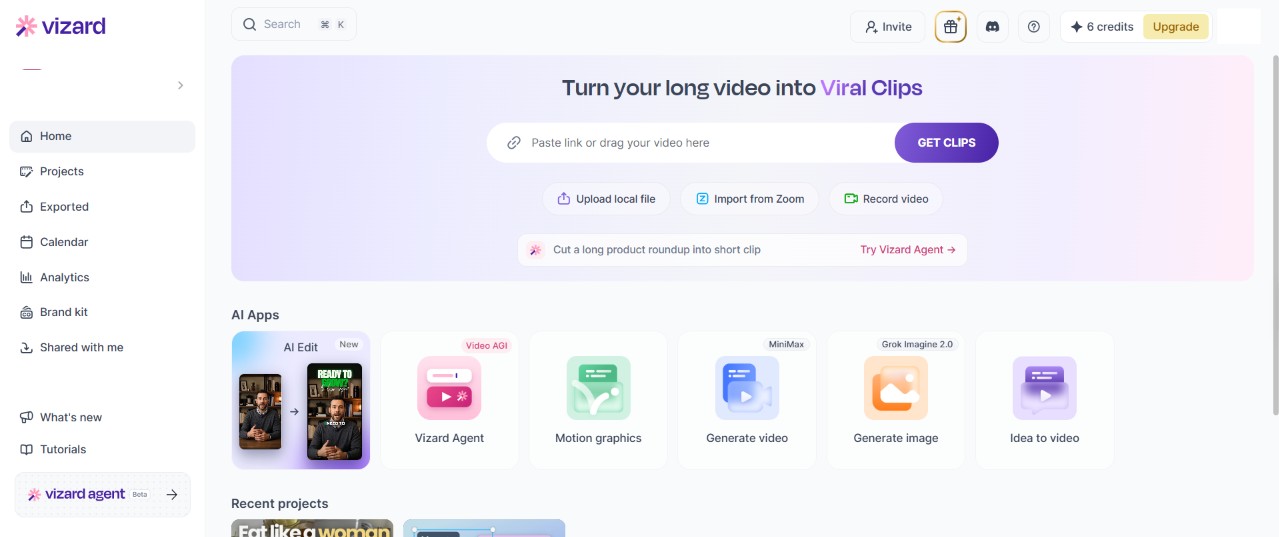
Once your video is uploaded, you can choose an AI clipping model, select your preferred clip duration, and enter custom instructions to guide the AI.
For our test, we used Vizard's V1 model and selected a clip duration of 30–60 seconds.
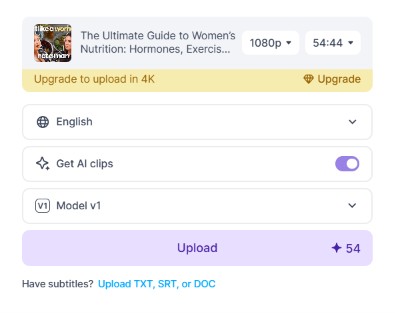
Once we clicked on the upload button, we had to go through an extra step of choosing more branding settings, and then we had to wait extra time for the actual video to upload. Total wait time for the video upload was 1 minute 57 seconds. Then, we had to click on yet another button to actually get the clips after 4:51 more minutes.
So, Vizard AI required a few extra steps and more waiting between stages.
Which platform was easier to use?
Choppity was the easier of the two to use. Figuring out how to navigate the platform was instant and very logical. Vizard AI, on the other hand, required a bit more exploring and trial and error to find our way around.
Brand Templates, Hooks and Customisation
It's important for your short clips to have a consistent look. But does this mean you have to manually adjust the same fonts, colours, and logos every time you upload a new video?
Of course not. And both Choppity and Vizard AI offer a solution for this.
Choppity has the Brand Template Wizard
It's one of our favourite Choppity features. In eight steps, it walks you through creating a reusable visual style for your clips.
The most interesting part is that if you just paste your website or YouTube channel link, the wizard will automatically detect your branding. This saves you the extra time you need to upload your logo and choose your brand colours, etc.
We tried this with Dr Faye Bate's YouTube channel, and Choppity pulled in her branding elements, including her logo and colour palette. It also suggested matching visual styles, so we didn't have to figure everything out ourselves.
From there, the wizard lets you customise your captions, hooks, speaker framing, backgrounds, logo placement and other visual elements.
Once you're happy with everything, you can save the template and use it whenever you generate new clips.
Vizard AI also has Branding Options
Vizard AI also allows you to set the branding of your clips and reuse it. It offers options for customising captions, adding logos, and adjusting branding elements.
We tried those, but we don't know where things went wrong. Here's what happened:
When we added our logo (manually) and generated the clips, the logo appeared in the middle of the video throughout the clip.
We wanted it to appear only at the end, so we had to use the editor's timeline to adjust its timing.
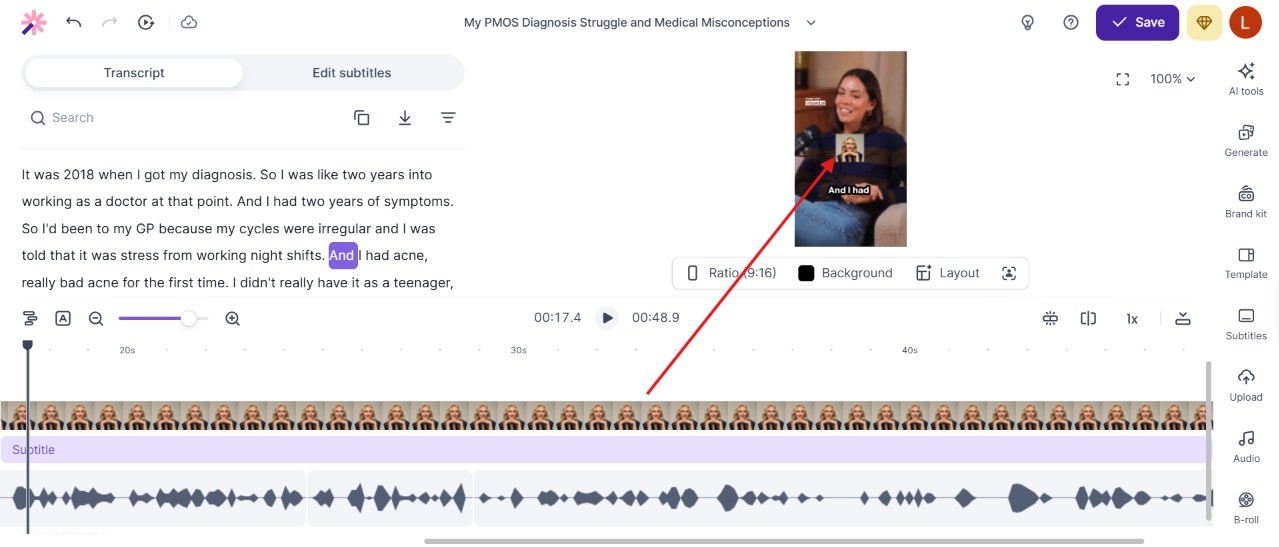
We think this happened because Vizard's branding setup wasn't as organised or guided as Choppity's.
For example, in Choppity's Brand Wizard, you get a dedicated step where you decide the placement and shape of your logo.
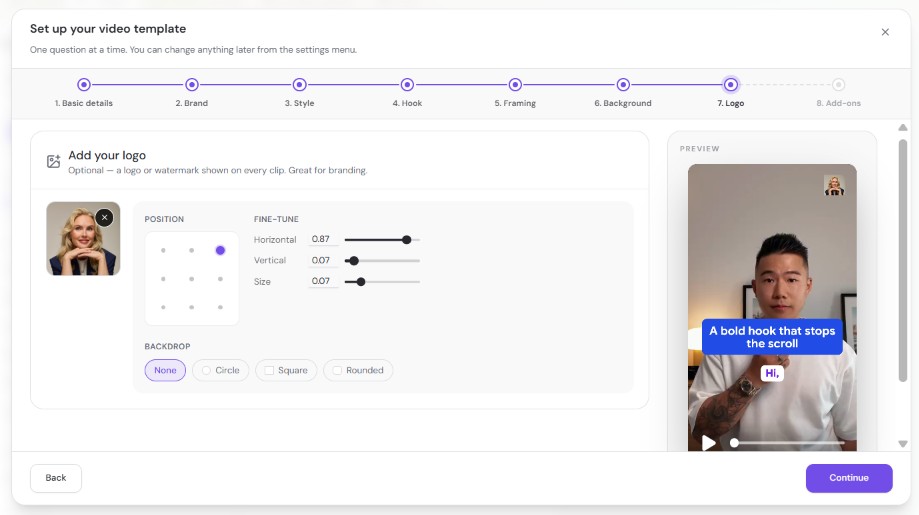
With Vizard AI, we might have missed a similar setting during the setup process, which made the experience feel less intuitive.
Which Platform Makes Branding Easier?
We particularly liked how Choppity guides you through the branding process.
Being able to paste a YouTube channel link so it automatically detects branding elements and saves everything as a reusable template made the setup feel much easier.
Captions and Active-Speaker Framing
When clipping long-form videos, especially where two people are speaking, we want the viewers to follow the conversation without having to figure out who's talking or struggle with incorrect subtitles.
That's why correct captions and speaker framing are two features we had to compare for both Vizard AI and its alternative, Choppity.
Choppity's Captions and Speaker Framing
Let's start with captions. Choppity, of course, automatically generates captions for your clips. And you can customize them in plenty of ways!
You can change the fonts, colours, animations, positioning, highlighting effects, etc. Everything you need to match your preferred style.
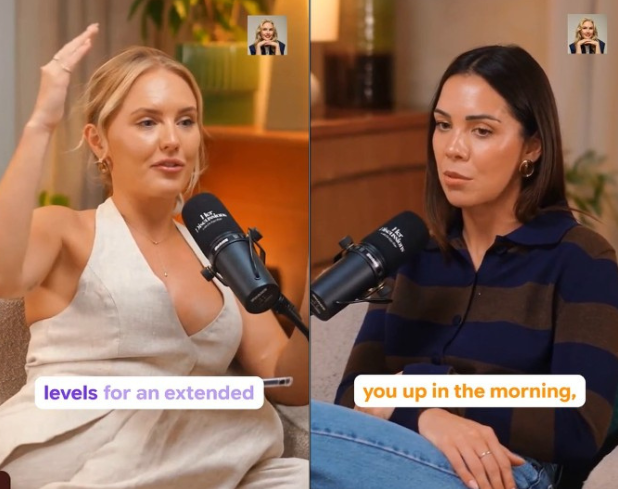
One feature we particularly liked was speaker-specific caption colours.
This feature allowed us to assign different caption colours to Dr Faye Bate and Dr Hazel Wallace.
Dr Faye Bate got purple captions, and Dr Hazel Wallace got orange captions.
Whenever the conversation switched between the two speakers, Choppity automatically changed the caption colour to match whoever was talking.
Even during quick back-and-forth exchanges, the caption colours changed to match whoever was speaking. This gave the clips a more polished look.
As for automatic speaker framing, it was also on point.
Choppity kept the active speaker visible and adjusted the framing as the conversation moved between Dr Faye Bate and Dr Hazel Wallace.
We even noticed some automatically generated zoom effects in one of the clips we reviewed.
Vizard AI's Captions and Speaker Framing
Vizard AI also offers automatic captions, different caption styles, and options to adjust fonts, colours, and positioning.
You can also edit the transcript directly to correct caption errors.
We tested this after noticing a transcription mistake in one of our generated clips.
The speaker said "obs and gynae consultant", but Vizard displayed "knobs and gunny consultant".
So you might want to check your captions when using Vizard AI if you want to avoid such mistakes.
As for automatic speaker framing, Vizard performed well.
It kept the active speaker visible throughout the clips we reviewed, making the conversation easy to follow.
Which Platform Offers Better Captions and Speaker Framing?
We particularly liked Choppity's speaker-specific caption colours and reusable branding templates. It also kept accurate captions, while Vizard AI disappointed us with the transcription error we mentioned earlier, where the captions didn't match what the speaker actually said. As for automatic speaker framing, both performed well during our test.
Video Editing and Automatic B-Roll
Not all the generated clips are perfect, and you might want to add your personal touch to some of them. That's why a good editing experience is also important when choosing an AI clipper for your projects.
Both Choppity and Vizard AI have built-in video editors, but we found one easier to use than the other.
Editing Clips and Correcting Transcripts
Choppity's Video Editor
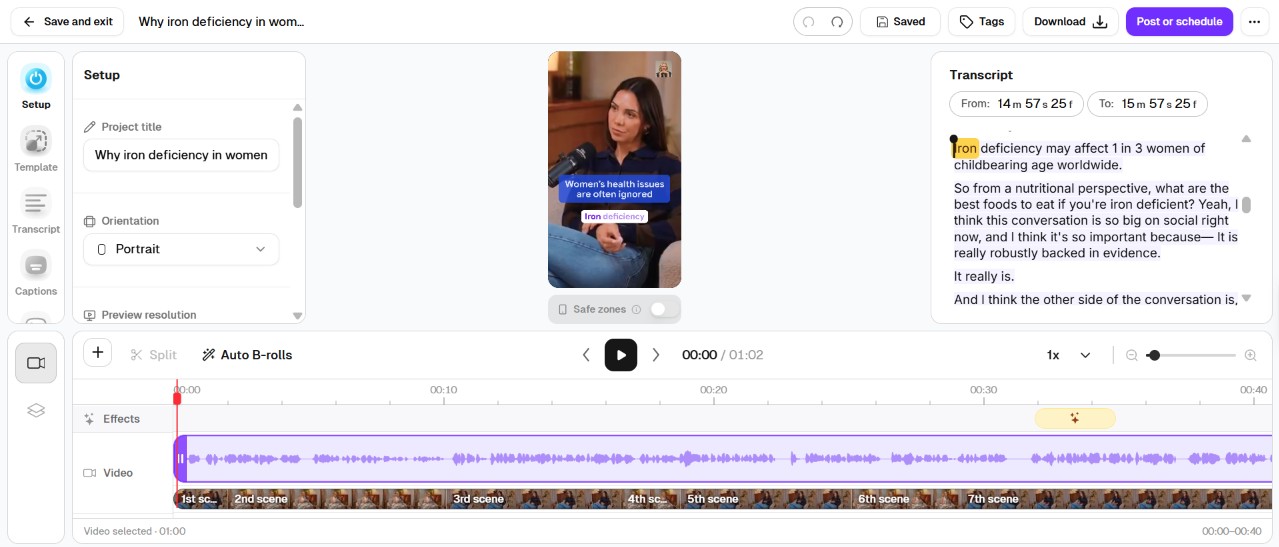
Our first impression was that it is very easy to find everything in the editor.
The video preview, transcript, timeline, and editing controls are all clearly organised in one workspace.
You can trim clips, correct transcripts, customise captions, adjust speaker framing, and add visual elements.
The transcript and timeline are right next to the video preview, so reviewing clips and making adjustments felt very straightforward.
Vizard AI's Video Editor
We mainly used Vizard AI's editor to fix two issues we found in its generated clips.
First, we corrected the caption error where Vizard transcribed "obs and gynae consultant" as "knobs and gunny consultant". We simply edited the text in the transcript, and the captions updated accordingly.
We also tried the Trim / Extend feature on the GLP-1 clip that started with "But the issue is".
By extending the clip backwards, we managed to include the missing context and make the opening easier to understand.
Both features worked well, and the editor was easy to navigate.
Which Video Editor Was Easier to Use?
Both editors let us make the adjustments we needed, but Choppity was easier to navigate.
Its clearly organised workspace made editing feel more intuitive, while Vizard required a little more exploring before we got comfortable with its controls.
Automatic B-Roll: What Each Tool Actually Does
If you want to make your clips more interesting and engaging, you can add visuals that match what the speaker is talking about. That's what we call B-roll.
Both Choppity and Vizard AI offer AI-powered B-roll features.
Choppity's automatic B-Roll
Choppity can automatically find and insert relevant footage from our own media library.
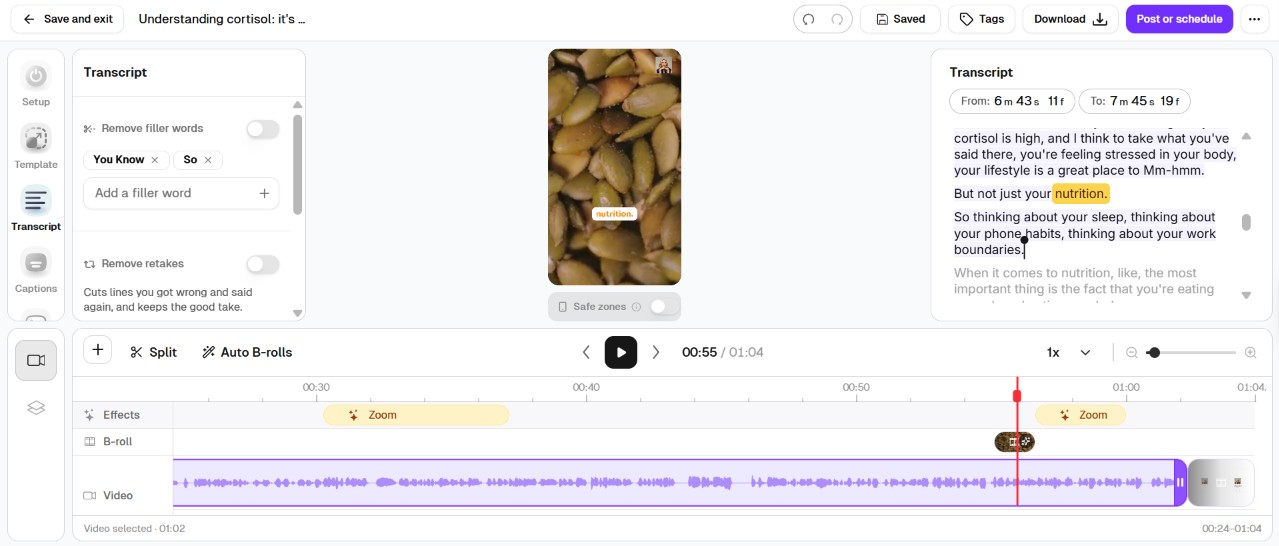
We tested this on a podcast clip about cortisol and nutrition.
We added several videos related to food, supplements, and women's health.
Choppity automatically picked a video of pumpkin seeds and inserted it at a relevant moment in the conversation about nutrition.
We didn't have to manually search for the footage or position it on the timeline.
This is particularly useful for businesses and creators who already have their own footage.
For example, a fitness coach could upload exercise demonstrations to run while they speak about those exercises.
Vizard AI's B-Roll Features
Vizard AI also offers automatic B-roll.
It has an integrated Pexels library where you can search for stock footage, and it can generate AI images and videos to match your content. You can also upload your own media.
Which Clipper Is Better for B-Roll?
Choppity is useful if you already have your own footage. But Vizard AI offers more options for sourcing new visuals. So if you prefer finding stock footage or generating new visuals with AI, Vizard AI offers that.
Other Useful Tools
Neither Choppity nor Vizard AI is limited to AI clipping and video editing. They actually have extra tools worth checking out.
Choppity's Additional Tools
Choppity comes with several tools that make this platform an all-in-one place where you can create videos from scratch, edit them, plan them, and publish them. This toolkit includes a Screen Recorder, Content Planner, Captions Generator, Transcript Generator, Video Editor, and Auto Multi-Cam.
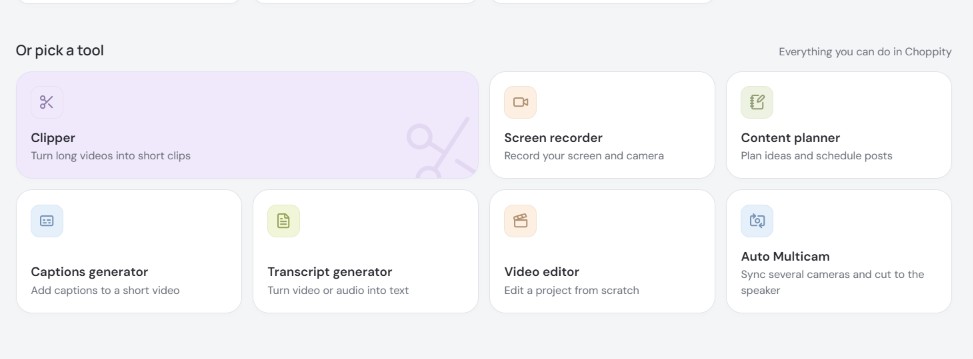
Choppity also offers bulk video uploads, social media scheduling and API/MCP integrations, so you can manage different parts of your content creation workflow in one place.
Vizard AI's Additional Tools
Vizard AI also offers several tools beyond AI clipping, including a Screen Recorder, Vizard Agent, Idea to Video, AI image and video generation, motion graphics and API/MCP integrations.
Vizard's additional AI tools also give creators options for generating new content, rather than just repurposing existing footage.
Our Takeaway
Both platforms offer useful tools beyond AI clipping.
We particularly liked how Choppity connects recording, transcription, editing and clip generation, making it convenient to repurpose your own videos.
Social Media Scheduling
You can schedule your generated clips to be published on your social media platforms directly from your clipper. This applies to both Choppity and Vizard AI. Here's how the experience was:
Choppity's Social Scheduling
Choppity made the journey from generating a clip to scheduling it for publication very easy.
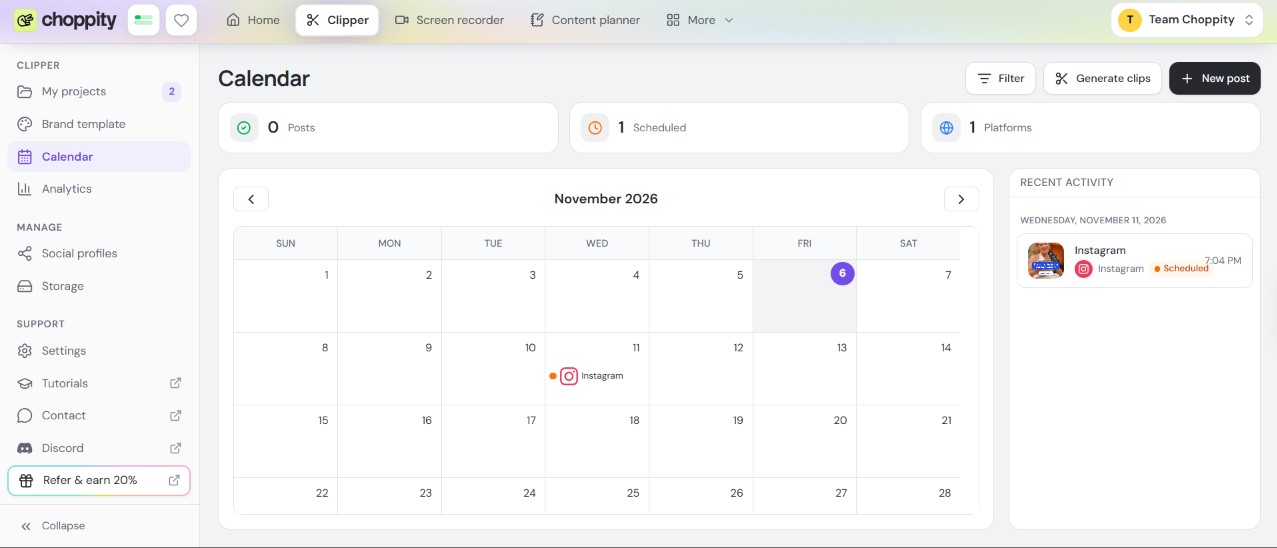
We connected an Instagram account, we selected one of our generated clips and chose a publishing date and time. And that was pretty much it. The post was successfully scheduled and appeared in Choppity's content calendar.
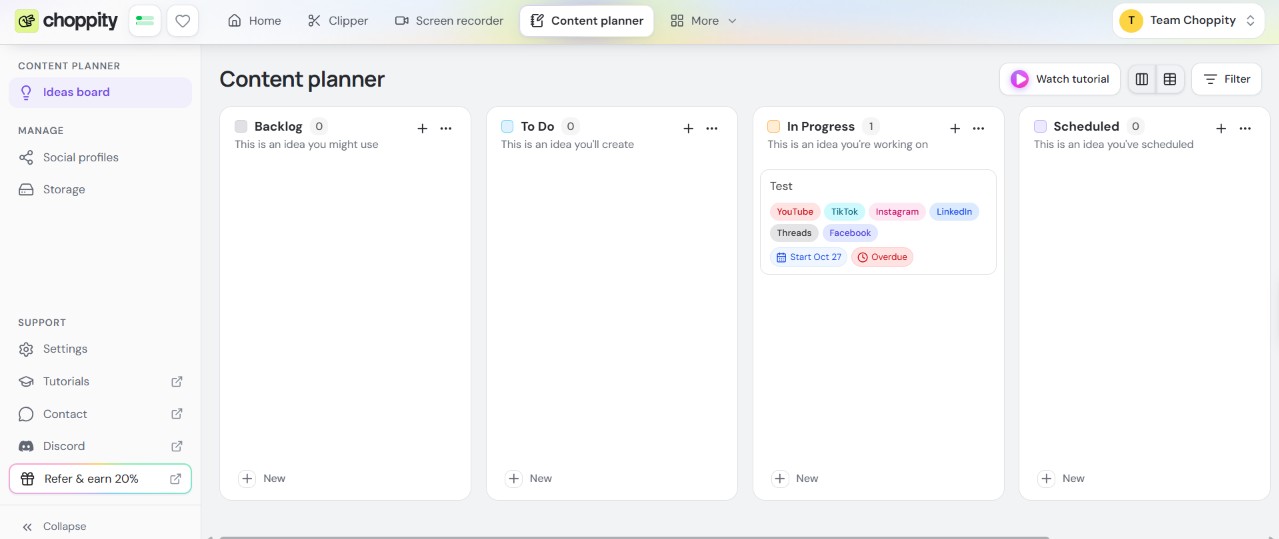
And if you're someone who likes organizing everything, you'll probably love the Content Planner. It lets you organise your content ideas and production tasks in a fun, visual board view, which can be useful if you're regularly creating and scheduling videos.
Social media scheduling is available from Choppity's Starter plan at $24/month.
Vizard AI's Social Scheduling
To test Vizard AI's scheduling and content calendar, we connected a TikTok account.
When we selected our pre-workout nutrition clip, Vizard generated a relevant description based on the video's content. We could also regenerate it or change its tone using custom instructions.
Its Content Calendar lets you organise upcoming posts, adjust publishing dates and manage multiple social accounts.
It also has an Auto-Schedule feature that can automatically select clips based on their virality scores, generate post descriptions, and schedule them according to your preferred posting days and times.
Which Platform Offers Better Scheduling?
We want to keep our content creation and publishing organized in one place; that's why we prefer Choppity. We can generate clips, edit them, schedule posts, and manage our content ideas through its Content Planner.
Customer Support
Both Choppity and Vizard AI offer several ways to get help when you need it.
Choppity's Customer Support
Choppity has an in-app support centre where you can chat with an AI assistant, contact the support team and browse helpful guides.
You'll also find tutorials and community resources to help you get familiar with the platform.
Vizard AI's Customer Support
Vizard AI also offers in-app support, a Help Centre, tutorials and a Discord community.
You can also submit feature requests, check its product roadmap and follow updates or service status information.
Which Platform Offers Better Support?
Both platforms make it easy to find help without leaving their websites.
Choppity keeps things simple with its in-app assistant and direct access to the support team, while Vizard offers additional resources for community discussions, feature requests and product updates.
Choppity vs Vizard AI Pricing: Plans and Value
Now, let's talk about everyone's favourite topic: pricing.
Choppity and Vizard AI have different ways of charging for AI video clipping.
Choppity uses video analysis hours, while Vizard AI uses credits. But which one gives you better value for your money?
Let's compare their monthly plans.
Choppity's Pricing Plans
Plan | Price/month | AI video analysis | Key features |
|---|---|---|---|
Free | $0 | 1 hour | AI clipper and editor, no downloads |
Starter | $24 | 3 hours | 4K exports, social scheduling |
Creator | $32 | 5 hours | Bulk uploads, brand templates, 3 social accounts |
Team | $48 | 5 hours | Unlimited seats, shared workspace, 5 brand templates |
Enterprise | Custom | Custom | Custom usage and enterprise features |
Vizard AI's Pricing Plans
Plan | Price/month | AI video credits | Key features |
|---|---|---|---|
Free | $0 | 60 credits | 720p exports with watermark |
Creator | $29 | From 600 credits | 4K exports, scheduling, 6 social accounts |
Business | $39 | From 600 credits | Brand Kit, shared workspace, 20 social accounts |
Prices are in USD and reflect the monthly subscription figures recorded during our research in November 2026.
Now, let us give you our honest opinion about each pricing system:
Choppity's Pricing: Simple, Hours-Based Allowances
Choppity's pricing is very easy to understand. If you know how many hours of video content you have, then you'll know how much you'll pay.
For example, the Starter plan gives you 3 hours for $24/month, while Creator increases that to 5 hours for $32/month.
So, if you regularly record one-hour podcasts, you can easily estimate how many episodes your allowance will cover.
On the higher plans, you'll unlock more useful features. Starter includes video downloads and social scheduling, Creator adds bulk uploads and reusable branding templates, while Team introduces collaboration tools and unlimited seats.
Vizard AI's Pricing: How Do Credits Work?
The credits system might look complicated. But on Vizard AI, one credit equals one minute of video processed.
That means Vizard's Creator plan, starting at $29/month with 600 credits, lets you process approximately 10 hours of footage using its standard clipping workflow.
That's considerably more than Choppity's 3-hour Starter allowance.
However, things become a little more complicated if you're using Vizard's additional AI tools, since features such as AI video generation can consume credits at different rates.
That's where credit-based pricing can become less convenient. Different AI features consume credits at different rates, so you'll need to keep an eye on how much of your allowance you're using.
Which Platform Offers Better Value?
Choppity has the lower starting price at $24/month, compared to Vizard AI's $29/month.
Choppity's straightforward, hours-based pricing is also very attractive if you want to know exactly how much footage you can process without calculating different credit costs.
However, Vizard AI offers more standard clipping time for the money, with approximately 10 hours on its entry-level paid plan compared to Choppity's 3 hours.
Ultimately, the better value depends on whether you prioritise processing volume, ease of use, or specific features.
Is Choppity a Good Free Vizard AI Alternative?
Yes! Choppity is worth trying if you're looking for a free Vizard AI alternative, especially if you want to explore a more intuitive clipping and editing experience.
Choppity's Free plan allows you to do many things. You can:
upload your videos
generate AI clips
experiment with customisation options
and see how well the results match your content goals.
Once you see the clip quality Choppity offers and how easy it is to use, you can upgrade to be able to download or schedule/publish your clips.
Vizard AI does allow free downloads as well, but they're limited to 720p and include a watermark, which isn't ideal for professional-looking content.
Our recommendation? Give Choppity a try and see how it handles your own videos.
Which AI Video Clipper Should You Choose?
Together, we put Choppity and Vizard AI to the test. We found that both can turn a long 54-minute podcast into short clips. But which one does it better? And which one should you choose?
Well, that depends on what you're looking for.
Choose Choppity if you:
Want an intuitive editing experience where you can upload, generate, and edit clips without much effort thanks to its guided workflow.
Want to publish content with specific goals in mind like getting more views, building trust, or generating sales - the AI clip scoring helps you find moments that match your objectives
Care about consistent branding and like how the Brand Template Wizard can automatically detect your branding and save it as a reusable template.
Want to reuse your own footage and let Choppity automatically insert relevant B-roll in your clips.
Prefer having everything in one place to record, clip, edit, plan, and schedule your content without constantly switching tools.
Consider Vizard AI If You:
Want to create new content with AI with tools like Vizard Agent, Idea to Video and AI-generated visuals.
Need free video downloads, although the quality is 720p and they include a watermark.
Prefer numerical clip scores about virality of the clip
Process a lot of footage through the entry-level paid plan, which offers a larger standard clipping allowance
Our Final Verdict
In this hands-on comparison of Vizard AI vs Choppity, we have a clear winner. For us, Choppity was the better fit for repurposing long-form videos into short clips.
It scored highly when it came to ease of use, custom branding, and clip quality. While Vizard AI sometimes generated clips that started without enough context or contained transcription errors, Choppity generally produced accurate captions and offered a more intuitive editing experience.
Why not see for yourself?
Try Choppity for Free and discover how it handles your own videos.
Frequently Asked Questions
What Is the Best Vizard AI Alternative for Clipping Podcasts?
Choppity is a great alternative to Vizard AI. In our test, Choppity generated 28 clips compared to Vizard AI's 5, so it gave us more moments to choose from. The overall experience of using the platform was also smoother and more intuitive.
Is Vizard AI Free?
Yes! Vizard AI offers a free plan with 60 credits per month. You can even download your clips, but they'll be limited to 720p and include a watermark, which isn't ideal for professional content.
Can I Try Choppity for Free?
Absolutely! Choppity's Free plan gives you one hour of AI video analysis, so you can try its clipping, editing, and captioning features before paying. You'll only need to upgrade when you're ready to download or publish your clips.
Which Is Easier to Use, Choppity or Vizard AI?
We found Choppity easier to use, thanks to its guided setup, intuitive editor and Brand Template Wizard. Vizard AI is also fairly straightforward, but some editing and branding controls took us longer to figure out.