
Your church media team records a powerful sermon every Sunday — but most of your congregation never sees it online. Short-form video on TikTok, Instagram Reels, and YouTube Shorts is where people discover churches today, and tools like Sermon Shots made that workflow possible for thousands of ministries. Still, many teams outgrow a clip-only tool and need deeper editing, native scheduling, and AI they can steer toward Scripture and calls to action.
We tested and compared seven sermon clipping tools to find the best options for churches evaluating a switch — or choosing their first platform. This guide covers honest Sermon Shots alternatives with comparison tables, verified pricing, and our ranked pick for church media teams in 2026.
At a Glance: Best Sermon Shots Alternatives Compared (2026)
We tested and compared every tool below. Here's the snapshot before the full reviews.
| Tool | Best for | Starting price | Native posting | Custom AI criteria | Our pick |
|---|---|---|---|---|---|
| Choppity | Churches needing clip → edit → schedule → analytics in one tool | $20/mo | Yes | Yes | ✅ #1 |
| Sermon Shots | Purpose-built sermon repurposing with devotionals | $49.99/mo | No | No | — |
| Opus Clip | Fast, hands-off clip volume | $15/mo | Limited | No | — |
| Submagic | Caption styling on pre-trimmed clips | $19/mo | Yes | No | — |
| Kapwing | Free browser editor with AI assist | $24/mo | Yes | No | — |
| Riverside | Record + clip in one platform | $29/mo | No | No | — |
| CapCut | Completely free manual editing | Free | Yes | No | — |
Pricing as of June 10, 2026 — verified on each tool's /pricing page (monthly billing, lowest paid plan). Free tiers include restrictions.
TL;DR — Why Choppity wins for church media teams
- ✅ Custom AI criteria — prompt it to find Scripture illustrations, calls to action, or testimony moments
- ✅ Magic reframe with face tracking keeps your pastor centred in every vertical crop
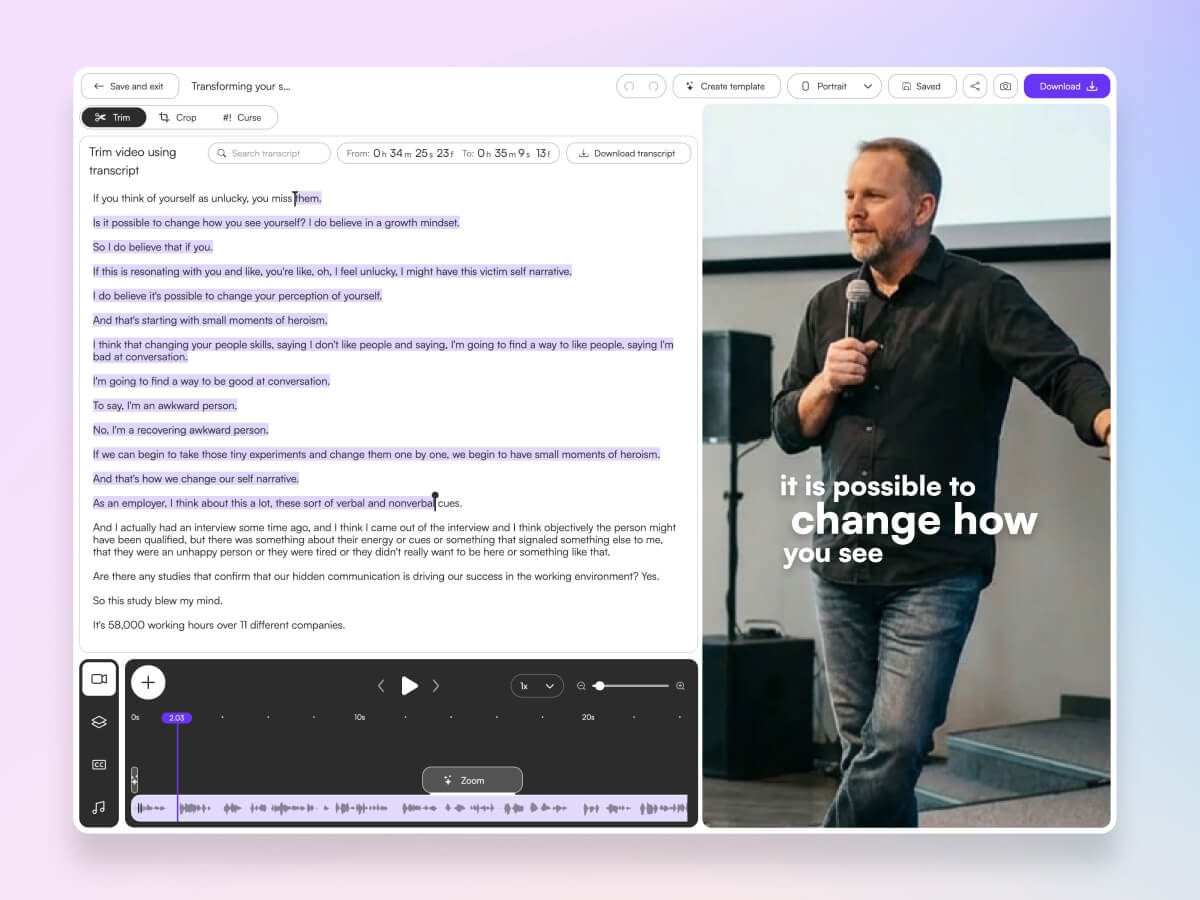
- ✅ Transcript-native editing — volunteers trim sermons by editing text, not timelines
- ✅ Native posting and scheduling to TikTok, Instagram, YouTube, and LinkedIn
- ✅ 20+ caption styles, 97-language support, and cross-platform analytics
- ✅ From $20/mo — less than half the cost of Sermon Shots Plus on monthly billing
“Choppity transformed how we share sermons. We went from posting once a week to daily clips — without any extra work from our volunteers.”
Ben
Lead Pastor, Southside Presbyterian Church
Try the Sermon Clip Generator free →
Already comparing options? See our full best sermon clip makers for churches roundup, explore how Choppity fits your ministry on our churches solution page, or test the workflow directly with the sermon clip generator.
Our Testing Methodology
We evaluated each tool on this list using long-form sermon recordings and the criteria below — 30–90 second clip targets, processing time, AI accuracy, caption quality, and post-clip workflow.
Metrics we tracked
- Processing time: How long from upload to first usable clip suggestions
- AI accuracy: Did it find complete thoughts — Scripture readings, illustrations, calls to action — or random loud moments?
- Caption quality: Transcription accuracy, styling depth, and multi-language support for diverse congregations
- Post-clip workflow: Editing depth, native posting, scheduling, and analytics — not just MP4 export
SERP articles and Reddit threads in r/churchtech often recommend Sermon Shots for sermon-specific AI or Opus Clip for speed. Both are valid starting points — but neither covers the full Sunday-to-social workflow (custom AI steering, transcript editing, native scheduling, and analytics) in one subscription. That gap drove our rankings.
Why Choppity Is Our #1 Pick for Church Sermon Clips
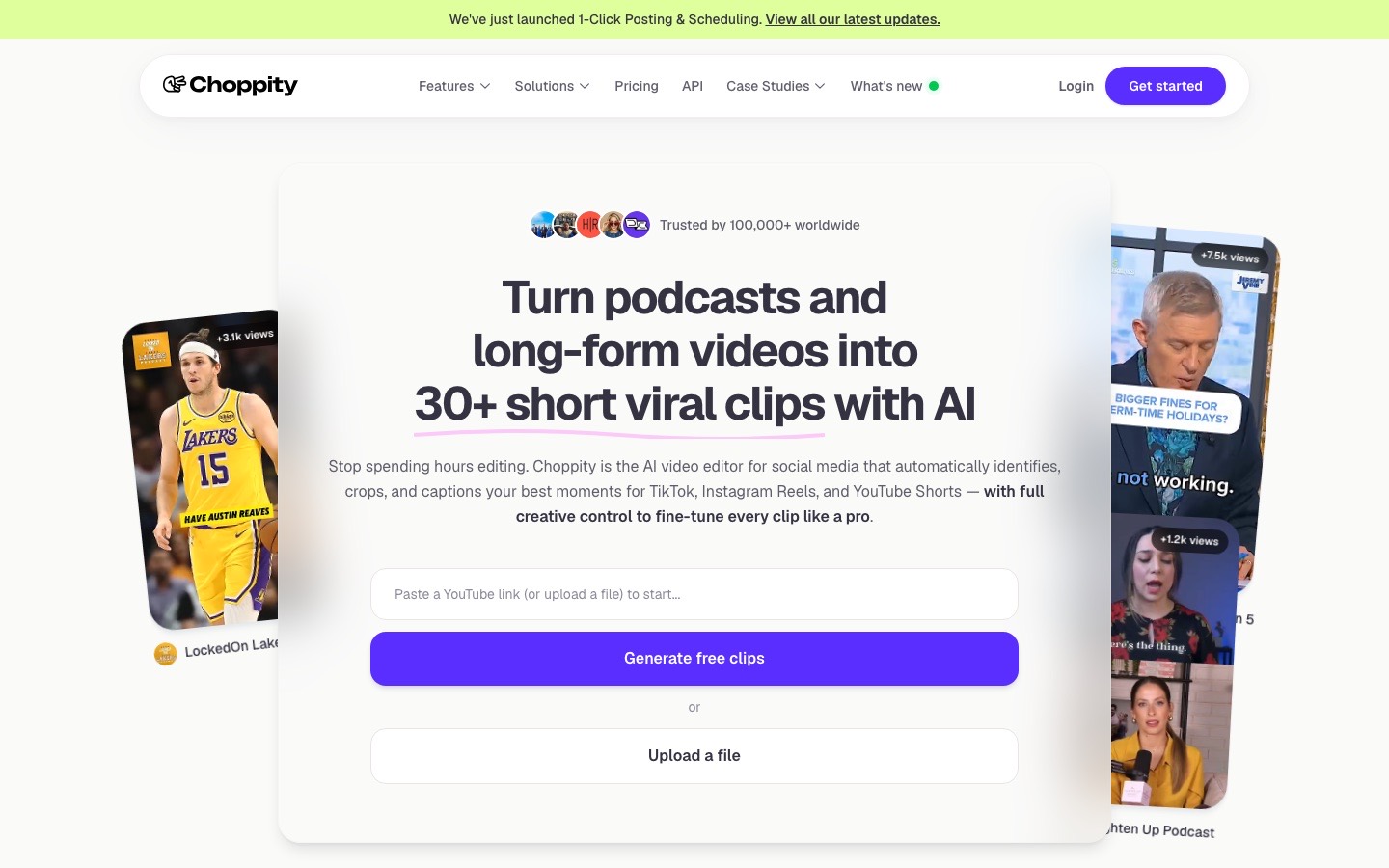
Choppity is the best Sermon Shots alternative we tested in 2026 because it matches sermon-specific AI with a complete ministry workflow: custom criteria for Scripture and calls to action, magic reframe face tracking for stage shots, transcript-native editing volunteers can learn in an afternoon, and native posting plus scheduling so one Sunday service fuels a week of social content.
The "Aha!" Moment
Church media volunteers know the pain: scrubbing 60 minutes of footage to find three Instagram-worthy moments. Choppity's custom AI criteria let you instruct the analysis before it runs — "find Scripture illustrations," "highlight calls to action," or "pull testimony moments." The AI filters the entire sermon to match, then surfaces complete thoughts instead of mid-sentence fragments.
Sermon Shots offers sermon-tuned detection and transcript search — genuinely useful for churches already on the platform. Choppity adds steerable natural-language criteria, a full transcript-native editor, native multi-platform scheduling, and cross-platform analytics Sermon Shots does not include. For teams ready to move beyond clip export into publish-and-measure, that difference matters.
How does Choppity work?
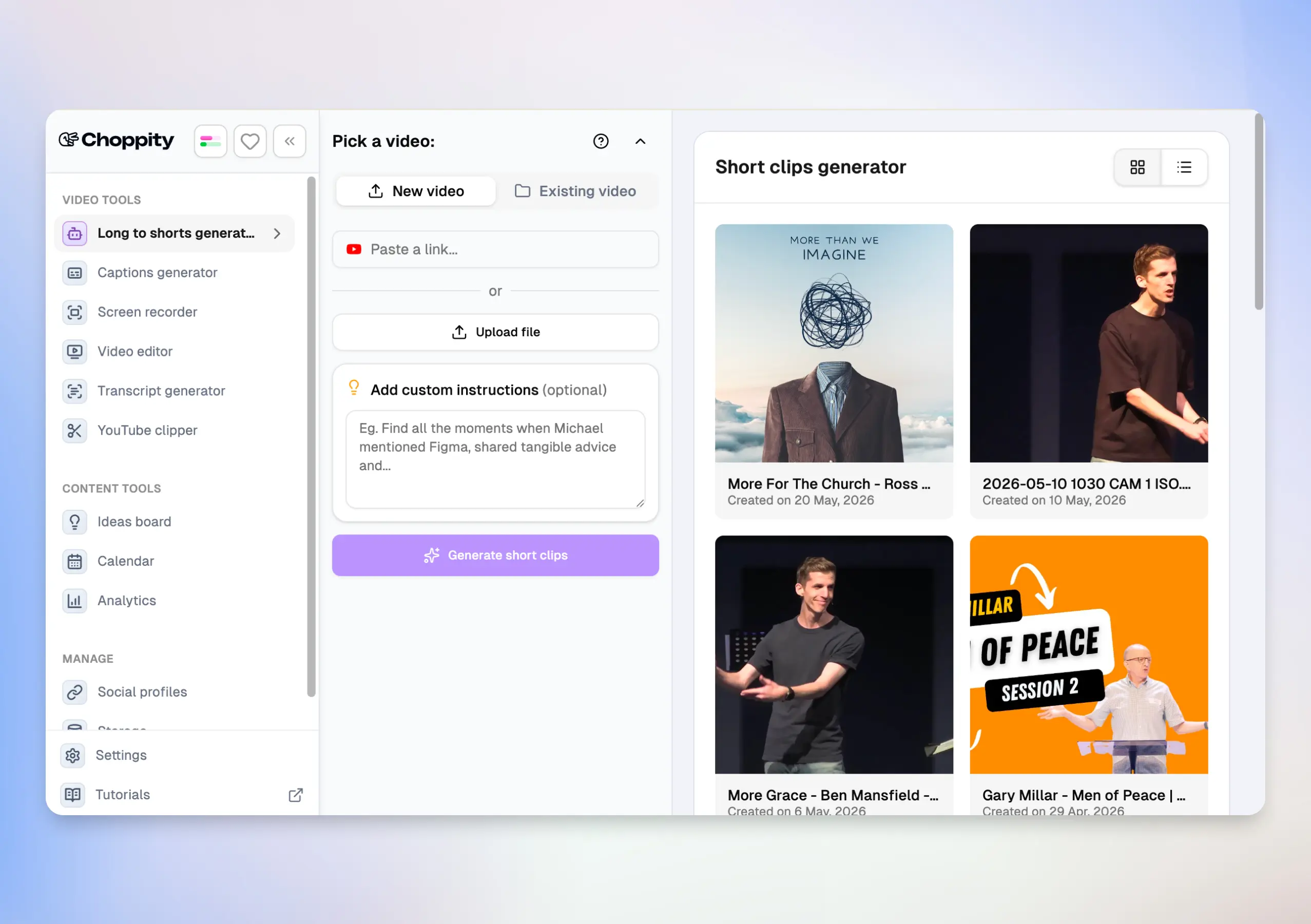
From Sunday sermon to scheduled social content in 3 steps:
- Upload your sermon recording or paste a YouTube link (up to 120 minutes)
- Set custom AI criteria (e.g. "find calls to action"), pick clip duration (15–180s), caption style, and magic reframe template
- Review AI clips, refine in the transcript editor, then post or schedule to TikTok, Instagram, YouTube, and LinkedIn
Find your best sermon moments in minutes
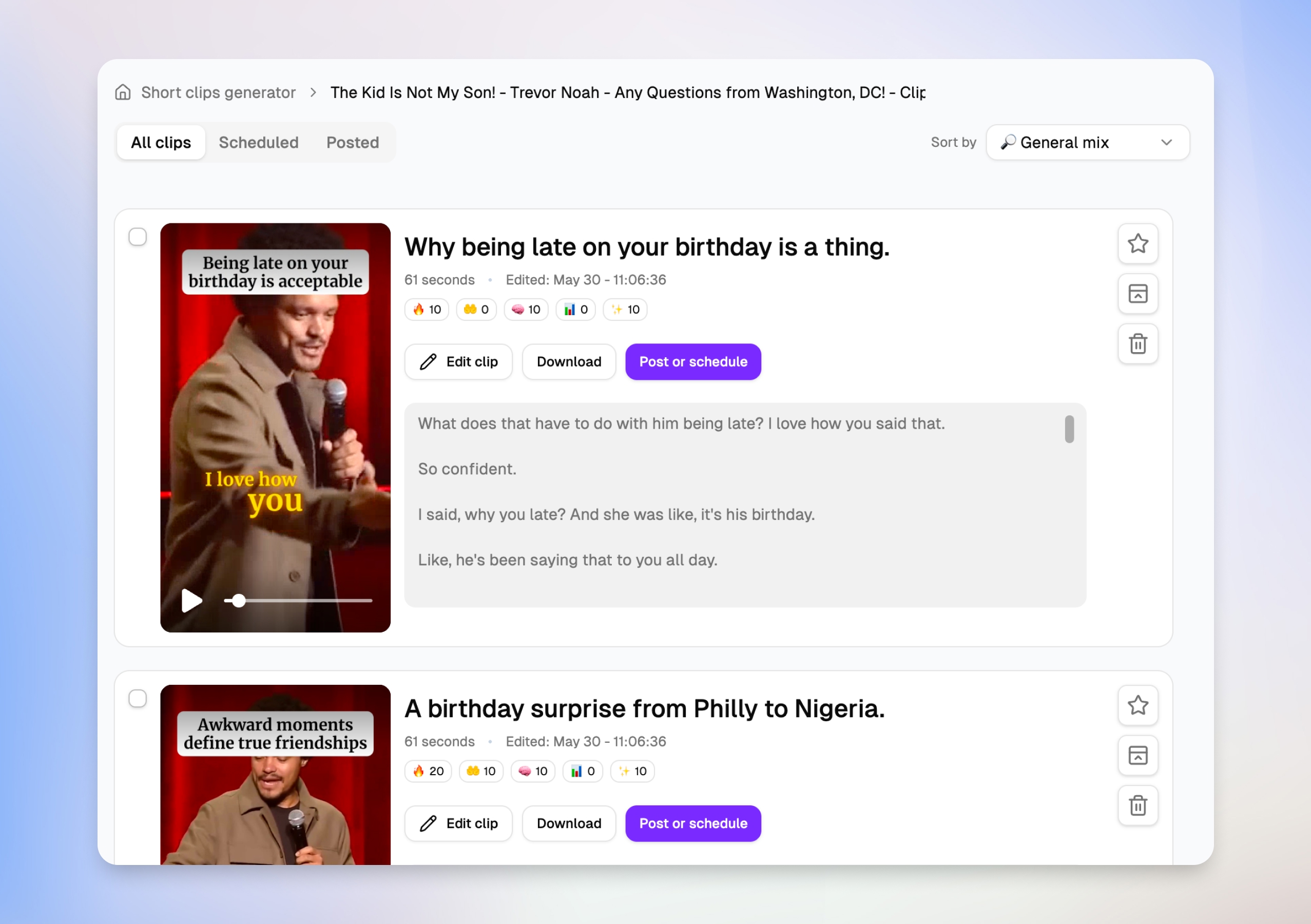
After you upload a sermon, Choppity surfaces dozens of clip suggestions — each with a title, duration, engagement scores, and a transcript preview. Your media team can scan what each short will actually say before opening the editor, then favorite, schedule, or jump straight to Edit clip without downloading anything.
Edit sermons by transcript, not timeline
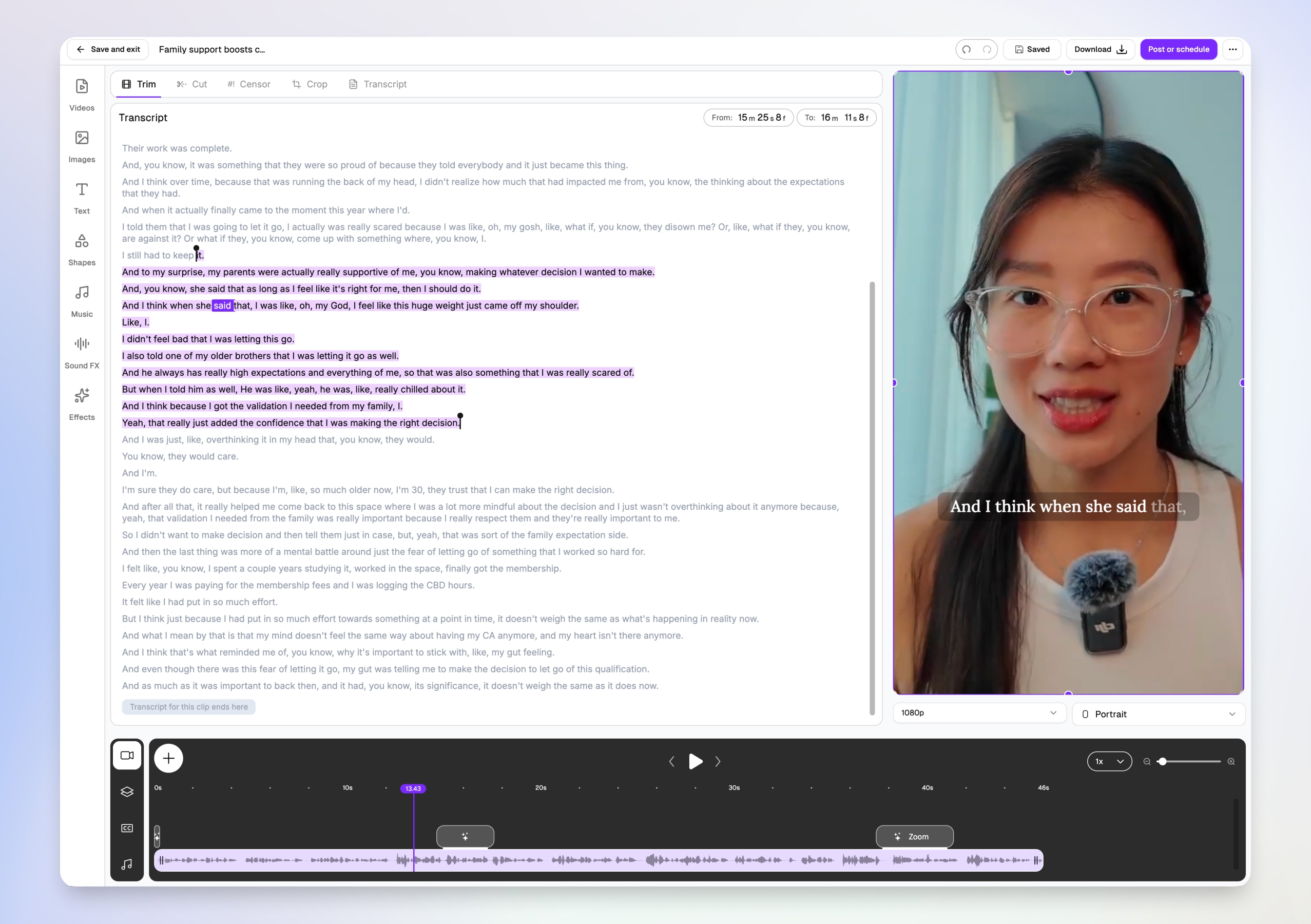
Volunteers don't need Premiere skills. Choppity's transcript-native editor lets you trim, cut, and censor by highlighting text — the video updates automatically. Word-level karaoke captions sync to the speaker in real time, and you can add B-roll, worship footage, and Scripture graphics from the same browser tab.
Face tracking for wide-angle stage shots
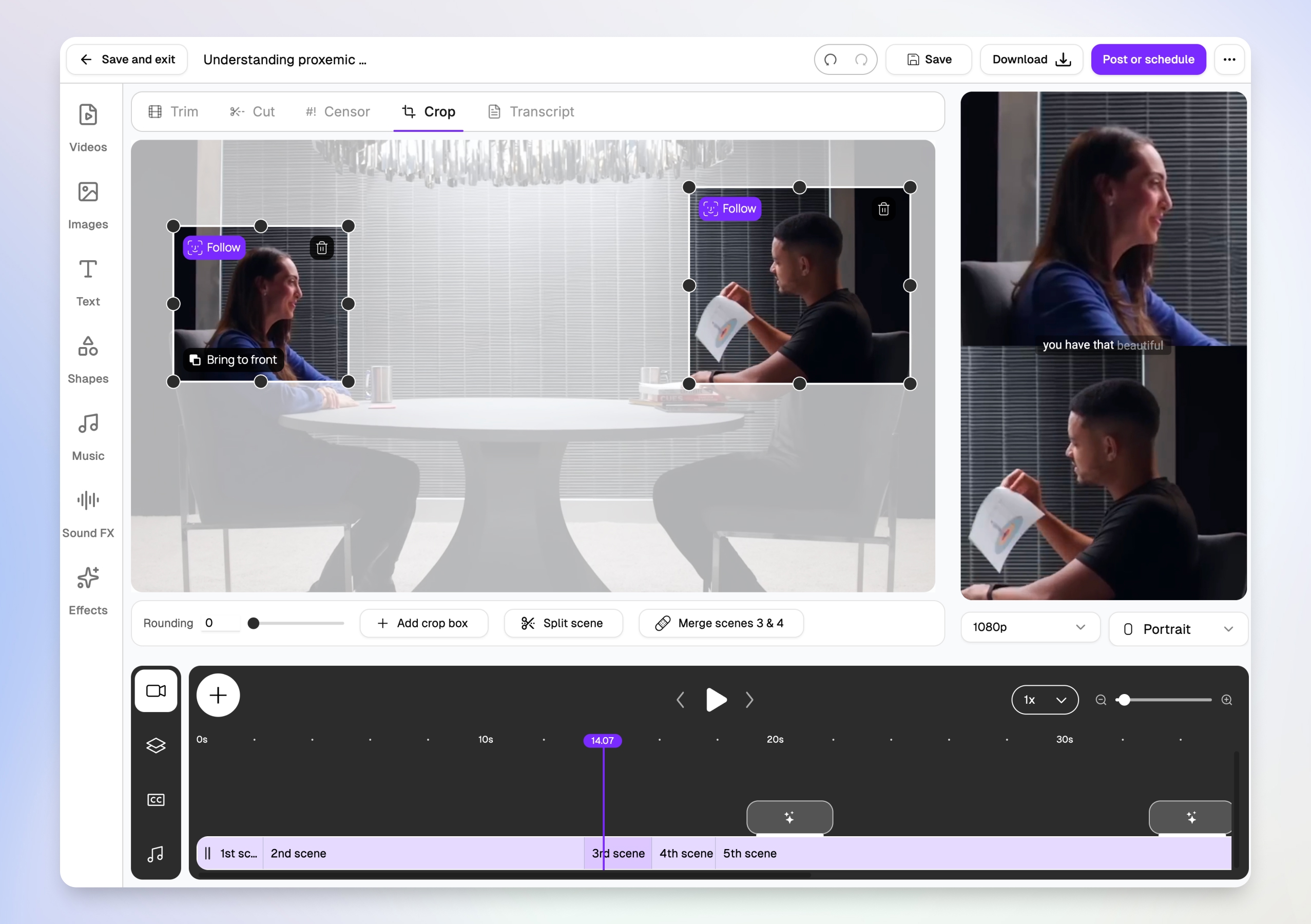
Wide-angle sanctuary footage is brutal to crop manually. Choppity's magic reframe follows the pastor with Follow tracking boxes, then outputs centered 9:16 vertical crops for TikTok, Reels, and Shorts — so the speaker stays in frame without hours of keyframing.
Post or schedule to every platform from one modal
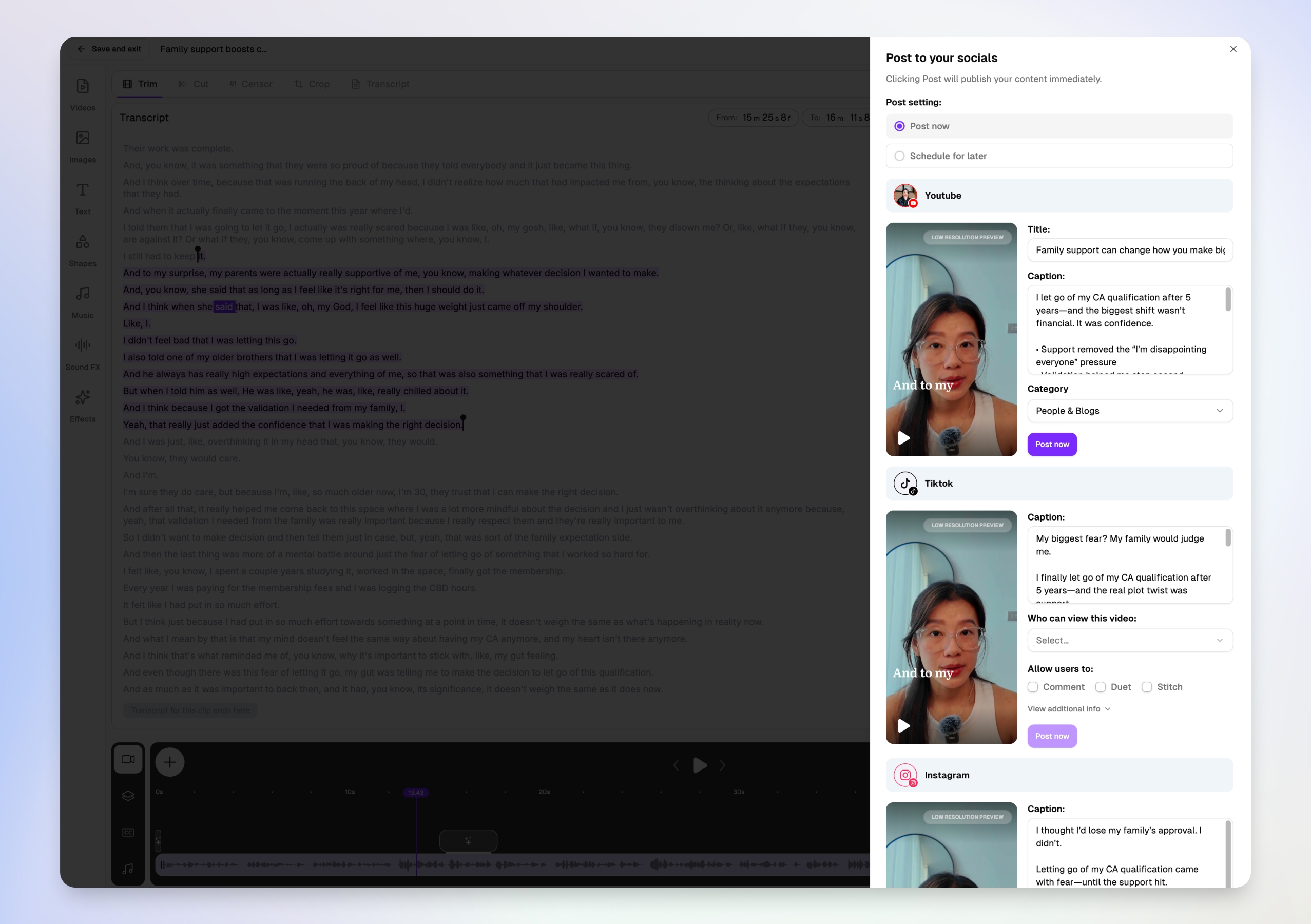
Downloading MP4s and re-uploading to five apps is where sermon repurposing dies. Choppity's Post to your socials modal lets you write platform-specific titles and captions for YouTube Shorts, TikTok, and Instagram in one view — then post now or schedule for later without leaving the editor.
More than a clip maker — full content workflow for churches
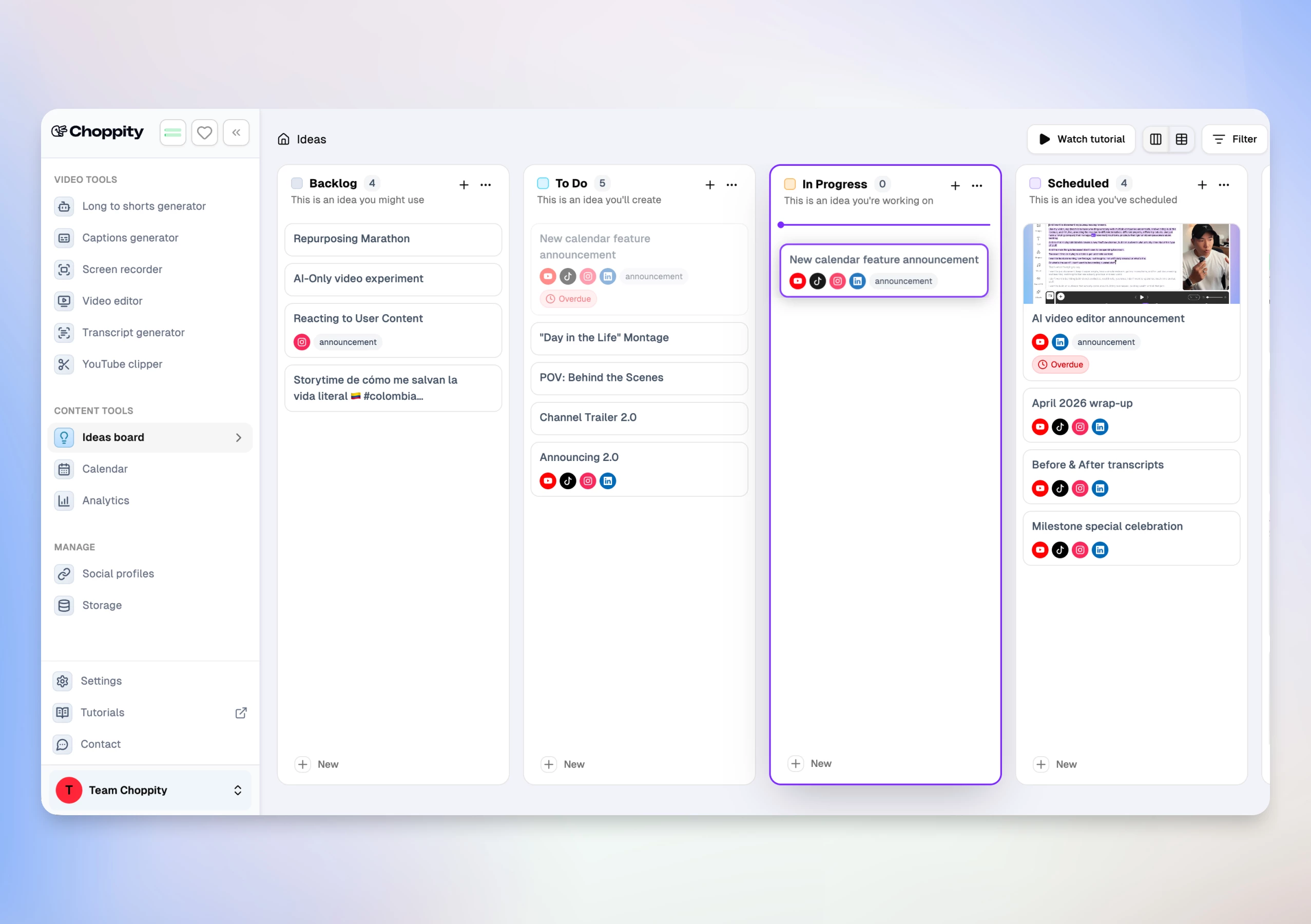
Most sermon tools stop at the clip. Choppity keeps going:
- Transcript-native editor — trim, cut, censor profanity, semantic search, B-roll overlays, worship footage, Scripture graphics, and 20+ animated caption styles with CFX effects
- Magic reframe — face and body tracking keeps the pastor centred in 9:16 vertical crops from wide stage shots
- Native posting & scheduling — per-platform captions, scheduled posts, and OAuth reconnect flows
- Analytics dashboard — impressions, likes, comments, and shares across posted sermon clips
- Ideas Board + Calendar — plan sermon series content from idea to published post
Real Use Case — Southside Presbyterian Church
Ben, the lead pastor at Southside Presbyterian Church (Brisbane, Australia), had a straightforward problem: a powerful sermon every Sunday, but almost no online reach beyond the live service. His media volunteer had no video editing background and couldn't sustain a workflow built on manual exports and re-uploads to every platform.
After switching to Choppity, Southside went from posting once per week to daily social content — all from a single sermon upload, with native scheduling replacing the export-and-reupload loop many churches hit when outgrowing clip-only tools like Sermon Shots. See Ben's full testimonial above.
Pros
- Custom AI criteria — natural-language instructions for Scripture, CTAs, and testimony moments
- Clip picker with engagement scores and transcript previews — decide what to post before you edit
- Magic reframe with face/body tracking for wide-angle stage footage
- Transcript-native editing — volunteers edit text, not timelines
- Per-platform titles and captions in one post-or-schedule modal
- 20+ caption presets, CFX effects, word-level karaoke, and 97-language transcription
- Native posting and scheduling to YouTube, TikTok, Instagram, and LinkedIn
- Cross-platform analytics and Ideas Board for team planning
- Profanity filter and filler-word cleanup built in
- Lower monthly cost than Sermon Shots Plus ($20/mo vs $49.99/mo)
Cons
- Free tier is preview-only — no downloads or full AI features until Starter ($20/mo)
- Maximum upload 120 minutes / 10 GB (sufficient for most single-service recordings)
- Does not generate devotionals or discussion guides — Sermon Shots Silver/Gold tiers add those written assets
Sermon Shots
Sermon Shots is the incumbent many churches already use — and for good reason. It was built specifically for sermon repurposing: AI-suggested highlights, speaker tracking ("AI Camera Crew"), transcript search, sentence-level trimming, hook animations, and optional devotionals, discussion guides, and blog posts on higher tiers. If your team is happy exporting clips and posting manually, it remains a capable sermon-first platform.
Pros
- Purpose-built for churches — sermon-tuned AI highlight detection
- Transcript search and sentence-level clip trimming
- Speaker tracking and synchronized captions with multilingual support
- Live stream and YouTube URL ingestion with automatic capture options
- Silver and Gold tiers add devotionals, discussion guides, sermon pages, and blog generation
- Free tier includes 2 sample clips — no credit card required
Cons
- No native social posting or scheduling — export clips and upload manually to each platform
- No custom natural-language AI criteria before analysis
- Plus plan starts at $49.99/mo on monthly billing — roughly 2.5× Choppity Starter
- Full written-content suite (devotionals, blogs) requires Silver ($67/mo) or Gold ($97/mo) tiers
- No cross-platform analytics dashboard for posted clips
Opus Clip
Opus Clip is the most recognized general-purpose AI clipper. Churches on Reddit often mention it as a budget alternative to Sermon Shots. It assigns a Clip Score for virality potential — useful for sorting suggestions, though sermon engagement patterns differ from entertainment content.

Pros
- Fast, mostly hands-off clip generation from full sermons
- Clip Score helps prioritize which moments to post first
- Lower starting price ($15/mo) than most sermon-specific tools
- AI B-roll generation on Pro plans
Cons
- Optimizes for viral hooks — may miss quieter, pastoral moments that matter to your congregation
- No sermon-specific AI or custom criteria for Scripture and CTAs
- Limited post-generation editing compared to Choppity's transcript-native NLE
- No cross-platform analytics or content planning board
Considering a switch? See our Choppity vs Opus Clip comparison.
Submagic
Submagic excels at animated caption effects — emoji overlays, dynamic text, and TikTok-native styling. Church teams sometimes pair it with another clipper when caption aesthetics matter more than sermon moment detection.

Pros
- Best-in-class caption animation templates
- Fast workflow once you have a trimmed sermon segment
- Social scheduling integrations on paid plans
Cons
- Weak long-form sermon moment detection — often needs manual segment selection first
- Not designed for full 60-minute sermon uploads
- No transcript-native deep editing, analytics, or church-specific AI
Considering a switch? See our Choppity vs Submagic comparison.
Kapwing
Kapwing is a browser-based editor with AI highlight detection, filler word removal, and 100+ language translation — popular with volunteer-led church media teams on tight budgets.
Pros
- Generous free tier — no credit card to start
- AI highlight detection plus manual editor in one browser tab
- Auto speaker focus and brand kit templates for consistent church branding
- Collaborative workspaces for media teams
Cons
- Watermark on free exports
- Generic AI detection — less context-aware for sermon structure than Choppity or Sermon Shots
- No custom AI criteria or cross-platform analytics
Riverside
Riverside combines remote recording with Magic Clips AI. Multi-campus churches or interview-style ministry content sometimes use it when recording and clipping in one platform matters more than sermon-specific features.

Pros
- High-quality local recording with separate audio tracks
- Magic Clips built into the recording workflow
- Strong transcription accuracy for spoken ministry content
Cons
- Clipping is secondary to recording — less sophisticated than dedicated sermon tools
- Expensive if you only need clipping, not remote recording ($29/mo Pro)
- No native social scheduling, custom AI criteria, or sermon-specific detection
CapCut
CapCut is the best free manual editor — full timeline, templates, and TikTok integration with no watermark. Budget-conscious churches use it when a volunteer has editing time but not subscription budget. There is no AI sermon highlight detection.

Pros
- Completely free with no watermark on exports
- AI auto-captions and massive template library
- Seamless TikTok publishing integration
Cons
- No AI sermon highlight detection — fully manual clip selection
- Time-intensive for weekly sermon repurposing at scale
- No scheduling, analytics, or team planning features
Head-to-Head Comparison
Side-by-side on the features church media teams ask about most when evaluating Sermon Shots alternatives.
| Tool | Sermon AI detection | Custom AI criteria | Face tracking | Transcript editor | Native posting | Analytics | Best for |
|---|---|---|---|---|---|---|---|
| Choppity | Excellent | Yes | Yes | Yes | Yes | Yes | Full sermon clip → edit → schedule → analytics workflow |
| Sermon Shots | Good | No | Yes | Basic | No | No | Sermon-first clipping with devotionals on higher tiers |
| Opus Clip | Good | No | Yes | Limited | Limited | No | Fast viral clip generation at low cost |
| Submagic | Poor | No | Basic | No | Yes | No | Caption effects on pre-trimmed clips |
| Kapwing | Good | No | Yes | Yes | Yes | No | Free browser editor with AI assist |
| Riverside | Basic | No | Basic | Basic | No | No | Record + clip in one platform |
| CapCut | None | No | Manual | No | Yes | No | Free manual editing |
Pricing as of June 10, 2026. Free tiers include restrictions — see each tool's site for current details.
Pricing Comparison (2026)
What you'll actually pay once you're ready to publish sermon clips without a watermark:
| Tool | Free tier? | Paid from | Annual discount | What you get on paid |
|---|---|---|---|---|
| Choppity | Yes — preview AI, no downloads | $20/mo | Yes (~30% off annually) | Starter: 3 hrs upload/mo, AI clips, transcript editor, captions, posting, scheduling, analytics |
| Sermon Shots | Yes — 2 sample clips | $49.99/mo | Yes (~$39.99/mo annual) | Plus: unlimited sermon clips, full transcription, 10 hrs uploads/mo, speaker tracking |
| Opus Clip | Yes — watermark | $15/mo | Yes (~$14.50/mo annual) | Starter: virality scoring, AI B-roll on Pro, team seats on higher tiers |
| Submagic | Yes — watermark | $19/mo | Yes (~41% off annually) | Starter: 15 videos/mo, premium caption effects, clip detection |
| Kapwing | Yes — watermark | $24/mo | Yes (~33% off annually) | Pro: no watermark, team collab, 4K exports |
| Riverside | Yes — limited | $29/mo | Yes (~17% off annually) | Pro: 4K recording, Magic Clips, 15 hrs multi-track/mo |
| CapCut | Yes (fully free) | Free | N/A | Full editor — manual clipping only, no paid clip tier required |
Pricing as of June 10, 2026. All "Paid from" prices are monthly billing on each tool's lowest paid tier. Sermon Shots Silver ($67/mo) and Gold ($97/mo) add devotionals, sermon pages, and multilingual text tools.
How to Choose a Sermon Shots Alternative
Clip detection vs. full ministry workflow
Sermon Shots and Opus Clip optimize for getting clips out the door. That's table stakes. The bigger question is what happens after AI suggests moments. If you need transcript editing, native scheduling, and analytics, a clip-only tool means manual uploads to every platform. Choppity covers the full Sunday-to-social loop; Sermon Shots covers clipping plus written assets on higher tiers but not native posting.
Custom AI criteria for sermon content
Generic AI clippers find loud or energetic moments. Sermon content needs complete thoughts — Scripture readings, illustrations, and calls to action. Only Choppity lets you steer analysis with natural-language instructions before it runs. Sermon Shots offers sermon-tuned detection but not user-defined criteria prompts.
Face tracking and stage footage
Wide-angle sanctuary shots are the norm. Tools with magic reframe and face/body tracking (Choppity, Sermon Shots, Opus Clip) keep the pastor centred in 9:16 crops. CapCut requires manual keyframing; Submagic assumes you already have a trimmed vertical clip.
Posting, scheduling, and analytics
Exporting MP4s and manually uploading to five platforms is where church social workflows stall. Choppity and Kapwing offer native posting; Sermon Shots and Riverside do not. Only Choppity combines posting, scheduling, and per-post analytics in the same product as sermon clip generation.
Frequently Asked Questions
What is a Sermon Shots alternative?
A Sermon Shots alternative is any tool that turns long-form sermon recordings into short, captioned clips for social media. Alternatives range from sermon-specific platforms like Sermon Shots itself to general AI clippers (Opus Clip, Choppity) and free manual editors (CapCut). The best fit depends on whether you need clipping only or a full edit → publish → measure workflow.
What is the best Sermon Shots alternative in 2026?
Based on our head-to-head testing with identical 60-minute sermon footage, Choppity is the best Sermon Shots alternative in 2026. It's the only tool we tested that combines custom AI criteria for Scripture and calls to action, magic reframe face tracking, transcript-native editing, native multi-platform scheduling, and cross-platform analytics — at $20/mo, less than half Sermon Shots Plus on monthly billing. Sermon Shots remains a strong choice if you want sermon-first AI and devotionals on higher tiers without native posting.
Is Sermon Shots worth it?
Sermon Shots is worth it for churches that want a purpose-built sermon clipper with transcript search, speaker tracking, and optional devotionals or discussion guides on Silver and Gold tiers. It's less ideal if you need native social scheduling, custom AI criteria, or cross-platform analytics — areas where Choppity differentiates. Test both with your actual Sunday footage before committing.
Is there a free Sermon Shots alternative?
Yes. CapCut is completely free for manual sermon clipping (no AI highlight detection). Kapwing offers the strongest free tier for AI-assisted clipping with watermarked exports. Sermon Shots includes 2 free sample clips. Choppity offers a free preview so you can test AI accuracy on your sermon before upgrading to Starter ($20/mo).
Choppity vs Sermon Shots — which is better for churches?
Sermon Shots wins on sermon-specific defaults, live stream ingestion, and written content generation (devotionals, blogs) on higher tiers. Choppity wins on the full workflow: custom AI criteria, deeper transcript editing, native posting and scheduling, and analytics — at a lower monthly price. Choose Sermon Shots if you export clips and post manually; choose Choppity if you want one tool from upload to scheduled post.
Can I switch from Sermon Shots to Choppity?
Yes. Upload the same sermon recording or paste your YouTube URL into Choppity, set custom AI criteria for the moments Sermon Shots found most useful (Scripture, CTAs, illustrations), and compare clip quality side by side. Most churches run both tools in parallel for one Sunday before switching subscriptions.
Does Choppity work for church sermons?
Yes. Choppity is built for long-form talking-head video including sermons. Custom AI criteria, magic reframe face tracking for stage shots, 97-language captions, and native scheduling make it a strong fit for church media teams. See the sermon clip generator, our churches solution page, and the broader sermon clip makers guide for workflow details.
What is the cheapest Sermon Shots alternative with AI clipping?
Opus Clip Starter ($15/mo) is the lowest-priced AI clipper in our test, followed by Choppity Starter ($20/mo) and Submagic ($19/mo). CapCut is free but requires manual clip selection. Sermon Shots Plus starts at $49.99/mo on monthly billing — the highest among sermon-focused options we compared.
Do sermon clip tools replace a video editor?
AI sermon clip tools replace the scrubbing work — finding moments in hour-long footage. They don't replace pastoral judgment on which messages to amplify. The best setup uses AI for first-pass clip generation and human review for the final cut. Choppity's transcript editor makes that review fast for volunteers without video training.
Which tool has the best captions for sermon clips?
Submagic leads on pure caption animation aesthetics. Choppity offers 20+ caption presets plus CFX dynamic effects, word-level karaoke, and 97-language support — the best balance of style and transcription accuracy for sermon content in our test. Sermon Shots includes synchronized captions with multilingual options on paid tiers.
The Verdict
After comparing seven tools in this roundup, the market splits cleanly: sermon-specific clippers (Sermon Shots), general AI generators (Opus Clip, Kapwing), caption specialists (Submagic), record-and-clip platforms (Riverside), and free manual editors (CapCut). Sermon Shots earned its place as the incumbent — honest sermon-tuned AI, speaker tracking, and written content on higher tiers. Many churches on r/churchtech are happy there.
If your team has outgrown export-and-manually-upload — or wants steerable AI for Scripture and calls to action, native scheduling, and analytics in one subscription — Choppity is the clear upgrade. At $20/mo it costs less than half Sermon Shots Plus while covering more of the Sunday-to-social workflow. Test both with your own footage before you switch.
For the full 11-tool comparison including Descript, Vizard, and Castmagic, see our best sermon clip makers for churches guide. Ready to turn this Sunday's sermon into a week of social content? Explore Choppity for churches or jump straight into the sermon clip generator.

Written by
Michael WongFounder & CEO · Founder of Choppity
Content creator for 12+ years with 215K+ YouTube subscribers and an active presence across YouTube, Instagram, LinkedIn, and X. As founder of Choppity, Michael has personally tested every major AI clip maker — giving him a unique perspective on what works and what doesn't for real creators.